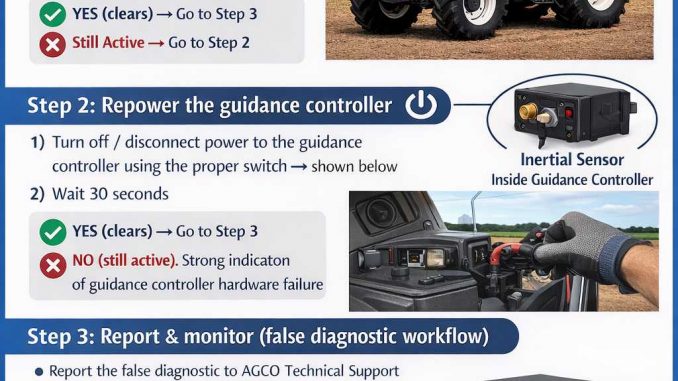
Learn how to troubleshoot Valtra BH Series 140–210 guidance error SA 28 SPN 520224 FMI 02. Step-by-step checks: stop and settle, repower guidance controller, and when replacement is required.
Related Contents:
2025 AGCO EDT (Electronic Diagnostic Tool) v 1.128 v1.75 Free Download
AGCO 2×4 CANUSB Diagnostic Kit
What the code means
- SA 28: The reporting controller (guidance controller)
- SPN 520224: Internal roll inertial sensor signal
- FMI 02: Erratic, intermittent, or incorrect signal
Why it happens
Common triggers include:
- The machine wasn’t fully settled (still rocking, on a slope, or soft ground)
- Temporary electrical/power irregularity (startup voltage dip, loose power connection)
- Internal hardware failure inside the guidance controller
Safety first
Before troubleshooting:
- Park on flat, stable ground
- Set parking brake and follow site safety procedures
- Keep the machine stationary during the “settling” step
Troubleshooting (recommended order)
Step 1 — Stop the vehicle and let it settle

Action
- Bring the vehicle to a complete stop
- Park on flat ground
- Wait 5 minutes (no movement)
Expected result
- The fault clears and does not immediately return
What it means
- YES (clears): Likely a false/temporary diagnostic caused by motion or unstable conditions
→ Go to Step 3 - NO (still active): Continue troubleshooting
→ Go to Step 2
Step 2 — Repower the guidance controller
Action
- Turn off / disconnect power to the guidance controller using the proper switch
- Wait 30 seconds
- Restore power and restart the guidance system
Expected result
- The fault clears after power cycle
What it means
- YES (clears): Likely temporary glitch or power-related event
→ Go to Step 3 - NO (still active): Strong indication of guidance controller hardware failure
→ Replace the controller according to the customer’s warranty/replacement plan (Stop here)
Step 3 — Report and monitor (false diagnostic workflow)
If the code cleared in Step 1 or Step 2:
- Report the false diagnostic to AGCO Technical Support
- The customer may resume operation
- Ask the operator to monitor the system—if the error reappears, repeat Steps 1–2 and document:
- Date/time and operating conditions (slope, speed, terrain)
- Whether it happens on startup or during turns/bumps
- Any recent wiring/power work or low-battery events
When replacement is the most likely fix
Replace the guidance controller if:
- The fault does not clear after settling + repower
- The fault returns frequently under normal, stable conditions
- You see additional guidance controller errors pointing to internal sensors
Quick summary
- FMI 02 = signal is erratic/intermittent/incorrect
- Try settling on flat ground → then repower controller
- If it won’t clear, the internal sensor is not serviceable → controller replacement is typically required
Leave a Reply