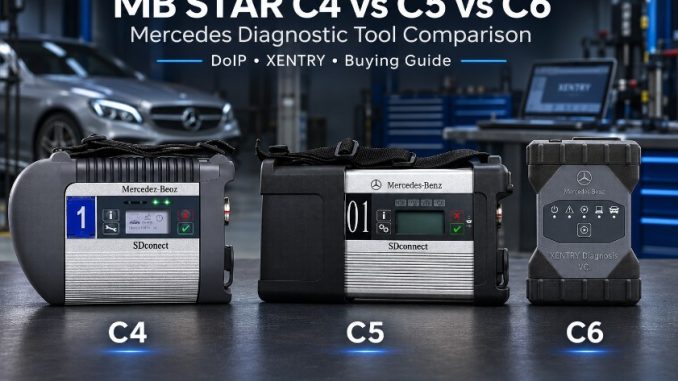
Choosing between MB Star C4, C5 and C6 starts with understanding the vehicles you service and the diagnostic functions you need. Fault diagnosis on an older Mercedes-Benz, adaptation after a component replacement, and programming a control unit on a newer vehicle can require different hardware, software and access permissions.
The model name alone does not establish compatibility. Aftermarket tools sold as C4, C5 or C6 can differ in their internal hardware, supported protocols and software requirements.
This guide compares the key buying considerations, explains why DoIP support matters, and helps you select a suitable Mercedes-Benz diagnostic package from OBDII.shop.
MB Star C4 vs C5 vs C6: Quick Comparison
For aftermarket diagnostic tools, the specific product configuration matters more than the number printed on the housing.
| Feature | MB Star C4 / SDconnect | MB Star C5-Labelled Tools | MB Star C6-Labelled Tools |
|---|---|---|---|
| Main buying consideration | Compatibility with your existing vehicles and diagnostic setup | Actual hardware specification and software compatibility | Verified DoIP capability and target-vehicle support |
| Laptop connection | LAN; WLAN on suitably equipped units | Depends on the specific interface | USB, LAN and/or Wi-Fi, depending on the interface |
| DoIP support | Verify the hardware; DoIP-labelled configurations are available | Verify the exact configuration | Confirm support on the specific product |
| Diagnostic software | Compatible XENTRY/DAS configuration | Depends on the underlying hardware | Depends on the interface, drivers and software configuration |
| Older-vehicle support | Confirm software, protocols and adapter cables | Confirm software, protocols and adapter cables | Verify legacy compatibility before replacing an older tool |
| Truck and bus support | Package dependent | Package dependent | Package dependent |
| Online coding and programming | Requires applicable software access and authorization | Requires applicable software access and authorization | Requires applicable software access and authorization |
The best choice is the tool confirmed for your vehicle, control module and intended procedure.
MB Star C4: A Practical Choice for Older Mercedes-Benz Vehicles
An SDconnect C4 configuration is worth considering when your workshop mainly services older Mercedes-Benz vehicles and needs more diagnostic depth than a basic OBD2 scanner provides.
Depending on the vehicle and software setup, available functions may include:
- Reading and clearing diagnostic trouble codes.
- Viewing live data and control-module identification.
- Running supported actuator tests.
- Performing service resets and adaptations.
- Following available guided diagnostic procedures.
- Carrying out supported coding operations where the necessary access is available.
For an older-vehicle workshop, correct software coverage, suitable adapter cables and reliable communication can matter more than moving to a different interface name.
Does MB Star C4 Support Wi-Fi?
Suitably equipped SDconnect units support wireless LAN as well as a wired LAN connection. The original SDconnect documentation includes both connection methods, so describing every C4 as wired-only is inaccurate. Wireless availability still depends on the hardware and configuration supplied with the unit.
Does MB Star C4 Support DoIP?
Check the specific hardware rather than assuming all C4 units have identical capabilities.
OBDII.shop lists an MB SDconnect C4 DoIP configuration with several hardware, software and laptop package choices. This does not establish that every existing C4 supports the same functions. Confirm the particular unit against your target vehicle and diagnostic task.
Considering a C4 setup? Review the MB SDconnect C4 diagnostic kit at OBDII.shop and choose the package that matches your laptop, vehicle coverage and software requirements.
MB Star C5: Check What the Package Actually Includes
When comparing an aftermarket MB Star C5 with a C4 or C6, request the exact hardware specification. A C5 label or a different enclosure does not provide enough information to judge communication capability.
Also distinguish an aftermarket C5-labelled interface from an original Mercedes-Benz XENTRY Connect system. Product names used by sellers should not be treated as proof that two systems have the same architecture or functionality.
Before buying, confirm:
- The interface type and required drivers.
- The supported laptop connection methods.
- Whether DoIP is supported for your intended application.
- The compatible diagnostic software release.
- The included cables and adapters.
- The functions available on your specific vehicle.
If you already own a working C4, identify the capability you need before replacing it. Wireless operation alone may not justify the change because suitably equipped C4 units already support WLAN.
A C5-labelled package makes sense when its verified configuration provides a useful improvement for your workshop.
MB Star C6: Focus on DoIP and Software Compatibility
For workshops receiving newer Mercedes-Benz vehicles, a verified DoIP-capable interface deserves consideration.
However, aftermarket products marketed as C6 are not necessarily identical. Laptop connections, drivers, software requirements and vehicle support may differ. OBDII.shop’s comparison of its C6 products describes several configurations with different operating requirements.
When evaluating a C6 package, ask:
- Does this specific interface support the vehicle’s diagnostic architecture?
- Which software installation and drivers does it require?
- Does it support the older vehicles you still service?
- Is the intended operation diagnosis, adaptation, coding or programming?
- Are passenger cars, vans or commercial vehicles included in the confirmed coverage?
OBDII.shop offers an MB Star C6 DoIP diagnostic package with different listed configuration choices. Check the selected package and confirm compatibility before ordering.
For more detail, read the differences between various C6 diagnostic tools.
What Is DoIP, and Why Does It Matter?
DoIP stands for Diagnostics over Internet Protocol. It carries diagnostic communication over Ethernet and is relevant to certain Mercedes-Benz vehicle architectures and programming operations.
A simple model-year cutoff is not a reliable buying rule. The required communication method depends on the vehicle platform, control module and procedure.
Mercedes-Benz’s XENTRY Pass Thru EU guidance identifies model series 206 and 223 when discussing pure DoIP vehicles. It also describes limitations affecting head-unit and instrument-cluster flashing on earlier architectures when the interface lacks DoIP support. These details relate to the documented XENTRY Pass Thru EU configuration and should not be treated as blanket approval of an aftermarket interface.
The practical question is:
Can this hardware and software combination perform the required operation on this particular vehicle?
DoIP capability establishes a communication feature. It does not automatically provide software coverage, coding permission or access to protected online services.
XENTRY, DAS and Online Coding: Understand the Difference
A Mercedes diagnostic setup consists of more than a multiplexer. The interface provides the communication link, while the software and access permissions determine which procedures are available.
| Component | What to confirm before buying |
|---|---|
| Diagnostic interface | Required protocols, vehicle support and laptop connection |
| XENTRY | Compatible release, vehicle coverage and installation requirements |
| DAS | Availability for the relevant older vehicle application |
| Drivers and interface utilities | Correct versions, pairing and firmware procedures |
| Diagnostic cables | Suitable connections for the vehicles you service |
| Online services | Required account, subscription and individual authorization |
Does C6 Include Online SCN Coding?
Do not assume online SCN coding or ECU programming is included with the hardware.
Ask separately whether the package supports your intended procedure and what additional access is required. Mercedes-Benz’s official XENTRY Pass Thru EU documentation states that individual XENTRY Flash authorization is required for access to its flash services.
A package advertised with coding software should therefore be evaluated at the function level. Reading fault codes, performing an adaptation and commissioning a replacement module are different capabilities.
Which MB Star Tool Fits Your Workshop?
For Workshops Mainly Servicing Older Mercedes-Benz Vehicles
Start with a compatible SDconnect configuration. Prioritize the software coverage and diagnostic cables needed for your daily workload.
Before choosing a package, list your most common chassis and procedures. This gives you a stronger basis for comparison than a broad claim such as “supports Mercedes-Benz.”
Explore the OBDII.shop MB SDconnect C4 package options and request confirmation for your vehicles.
For Workshops Servicing Both Older and Newer Vehicles
Look for verified DoIP capability alongside the legacy support you still need.
Before replacing an existing interface, confirm that the new setup covers your older vehicles, including the required software applications and adapter cables. A newer-looking interface does not establish compatibility with every earlier platform.
For Newer Passenger Cars and Electric Vehicles
Request confirmation for the exact model, control module and operation.
A tool that can read vehicle faults may still require different software access or authorization for module commissioning or programming. For electric vehicles, diagnostic compatibility also does not establish suitability for every high-voltage service procedure.
Review the C6 DoIP diagnostic package at OBDII.shop as a candidate and provide your vehicle details before selecting a configuration.
For Mercedes-Benz Trucks and Buses
Ask explicitly about commercial-vehicle support.
Confirm the diagnostic software, interface voltage suitability, adapter cables and any required access credentials. Passenger-car compatibility should not be used to assume truck or bus coverage.
What to Check Before Ordering
To help OBDII.shop recommend a suitable configuration, provide:
- Vehicle: Model, model year and chassis code.
- Application: Passenger car, van, truck or bus.
- Required function: Fault diagnosis, active test, adaptation, coding or programming.
- Target module: The system or control unit you need to access.
- Existing equipment: Laptop model, Windows version and installed diagnostic software.
- Preferred package: Hardware only, software installation or a laptop bundle.
For programming work, follow the vehicle manufacturer’s power-support and connection requirements. A successful diagnostic scan does not establish that the setup is ready for an ECU flash.
Frequently Asked Questions
Is MB Star C6 Always Better Than C4?
No. The better choice depends on the verified configuration and your workload. A compatible C4 setup may meet an older-vehicle workshop’s needs, while newer vehicle architectures may require capabilities your existing interface does not provide.
Can MB Star C4 Use Wi-Fi?
Suitably equipped SDconnect units support WLAN. Confirm that the specific unit includes the required wireless hardware and configuration.
Can a Software Update Add DoIP to Any C4 or C5?
DoIP requires compatible hardware and software. Installing a newer diagnostic release does not prove that an existing interface supports it. Verify the hardware revision and target application.
Does Every C6 Work With the Same Software?
Do not assume so. Confirm the interface type, drivers and compatible software installation for the particular product.
Does an MB Star Kit Include Free Online Coding?
Hardware ownership does not automatically include online coding or programming access. Confirm the required account permissions, service availability and any additional charges separately.
What Should I Choose for W206 or W223 Diagnostics?
Choose a configuration confirmed for the relevant DoIP architecture and the procedure you intend to perform. Check the interface, software and diagnostic-access requirements together.
Should I Buy Hardware Only or a Laptop Package?
Hardware-only may suit buyers who already have a compatible diagnostic computer. A laptop package may be more convenient if you need the computer and software setup together. Confirm installation, activation and first-use requirements for the selected package.
Find the Right Mercedes Diagnostic Package at OBDII.shop
The right MB Star C4, C5 or C6 diagnostic tool should match the vehicles you service and the procedures you need to complete.
Compare the MB SDconnect C4 diagnostic kit and the MB Star C6 DoIP package, then email sales@obdii.shop with your vehicle model, chassis code and required functions.
Request a compatibility check before ordering so you can choose the configuration suited to your workshop.
Leave a Reply