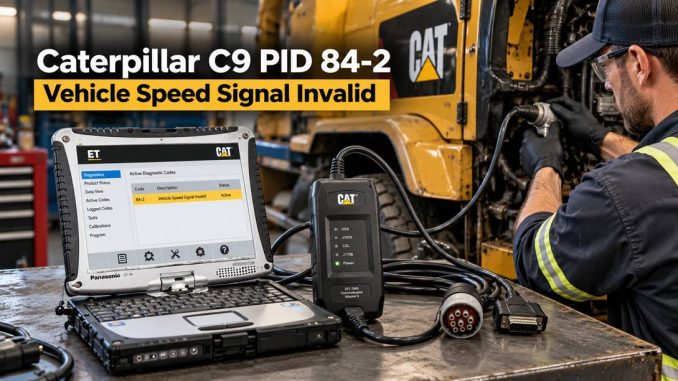
A Caterpillar C9 engine with Code 36 PID 84-2 indicates that the Engine Control Module (ECM) has detected an invalid vehicle speed signal.
This fault can result from incorrect ECM calibration, damaged vehicle-speed wiring, a faulty speed sensor, a J1939 communication issue, or, in some cases, a modified vehicle speed signal.
This guide explains how the Caterpillar C9 receives vehicle speed information and what to check before replacing parts.
Fault Information
Engine: Caterpillar C9
Diagnostic Code: 36 PID 84-2
Description: Vehicle Speed Signal Invalid
Recommended Diagnostic Equipment
- CAT ET diagnostic software
- CAT Communication Adapter 3
- Digital multimeter
- Vehicle wiring diagram
- Suitable breakout leads or back-probing tools
For technicians who regularly work on Caterpillar engines, the CAT Communication Adapter 3 works with CAT ET to communicate with the engine ECM, read diagnostic codes, monitor parameters, and troubleshoot.
CAT Communication Adapter 3:
CAT ET Software:
https://www.obdii.shop/goods-120-Cat-Caterpillar-ET-Software.html
When Does PID 84-2 Become Active?
The ECM monitors vehicle speed together with other engine and vehicle parameters.
The fault may be logged when the ECM determines that the reported vehicle speed does not agree with the operating conditions.
For example, the ECM may detect that:
- vehicle speed remains constant when operating conditions indicate that speed should be changing;
- the vehicle-speed calibration is incorrect;
- the vehicle-speed input contains an unstable or invalid signal;
- the ECM receives incorrect information over the J1939 data link;
- vehicle-speed wiring is open, shorted, or affected by electrical noise.
On some applications, the diagnostic strategy may also compare vehicle speed with engine speed after the engine has been operating above a specified RPM threshold.
Important: Although this code can occur after the vehicle-speed circuit has been altered, do not assume tampering is the cause. Check wiring, calibration, and communication faults first.
How the Caterpillar C9 Receives Vehicle Speed
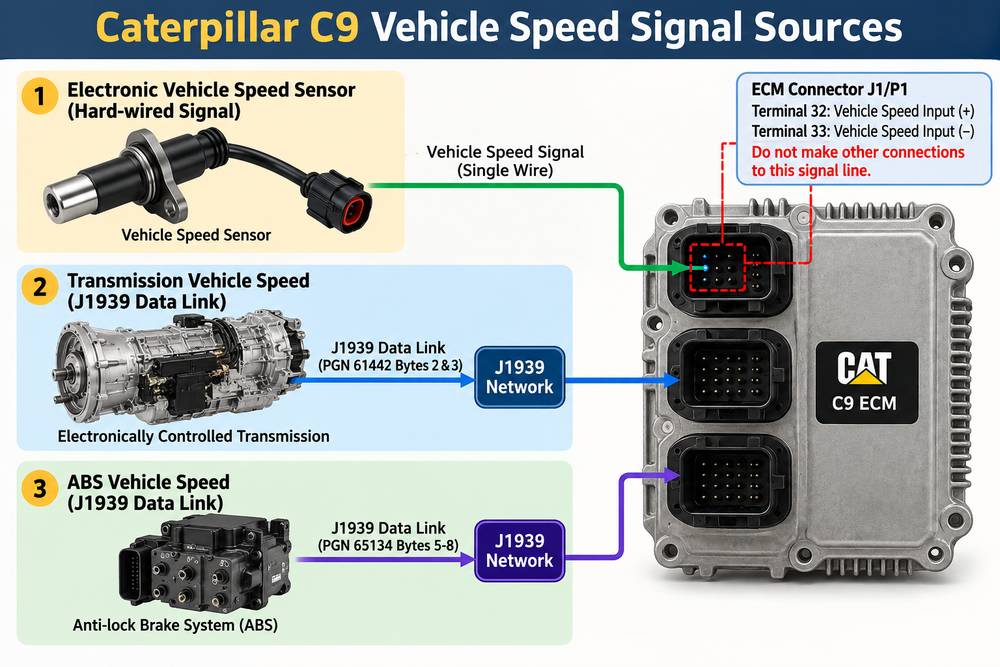
Understanding the source of the speed signal is important because Caterpillar C9 installations do not all use the same configuration.
There are three common possibilities.
1. Hard-Wired Electronic Vehicle Speed Signal
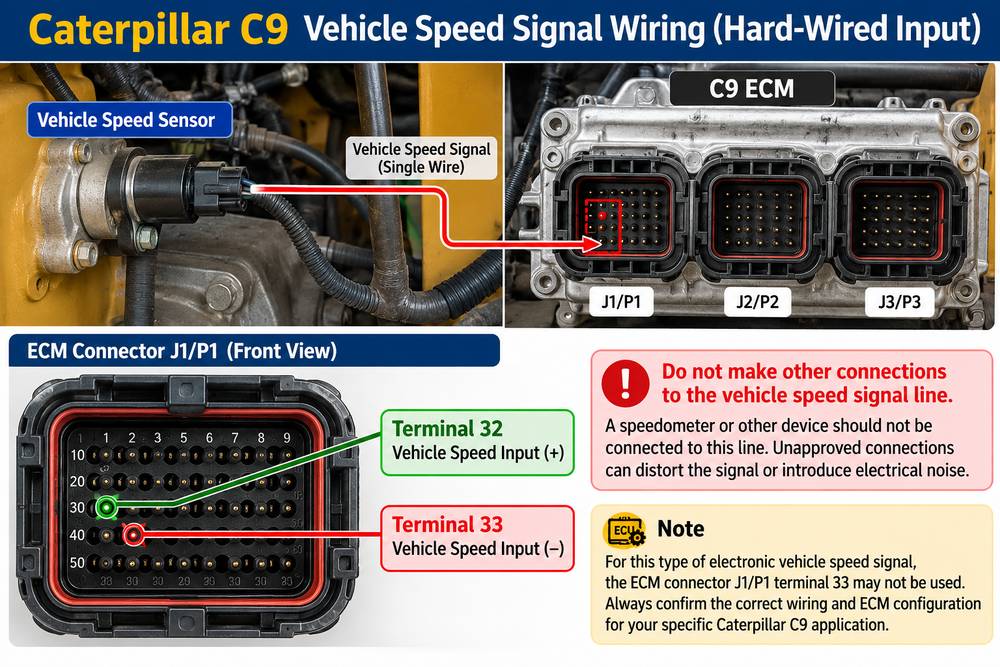
On some vehicles, an electronic speed source sends the signal directly to the engine ECM.
The vehicle speed input may be connected through:
ECM connector J1/P1 terminal 32 — Vehicle Speed Input Positive
For applications using this type of electronic signal, do not connect additional devices to the same signal line unless the vehicle manufacturer’s wiring information specifically allows it.
Unapproved connections can distort the signal or introduce electrical noise.
Depending on the configuration, terminal 33 may not be used for this electronic speed source. Always confirm the correct wiring for the specific chassis before modifying the circuit.
2. Vehicle Speed from the Transmission via J1939
The ECM may also calculate vehicle speed from information supplied by an electronically controlled transmission over the J1939 data link.
In this configuration, transmission output-shaft speed is transmitted electronically to the engine ECM.
When the ECM is configured to use the J1939 transmission speed source, it may ignore the conventional vehicle-speed input circuit at terminals 32 and 33.
The ECM then calculates road speed using:
- transmission output-shaft speed;
- J1939 data;
- the programmed Vehicle Speed Cal (J1939-Trans) value.
If this calibration value is incorrect, the ECM may calculate an incorrect vehicle speed even though the transmission and J1939 network are operating normally.
3. Vehicle Speed from ABS via J1939
Some vehicles obtain vehicle speed information from the Anti-lock Brake System.
The ABS controller broadcasts wheel-speed information over the J1939 network, allowing the engine ECM to calculate vehicle speed.
Problems can therefore originate from:
- wheel-speed information;
- ABS controller communication;
- J1939 wiring;
- network termination;
- incorrect tire or calibration information;
- ECM configuration.
This is why replacing the vehicle speed sensor immediately after seeing PID 84-2 is often the wrong diagnostic approach.
Probable Causes of Caterpillar C9 PID 84-2
The most common areas to investigate are:
- Incorrect ECM vehicle-speed configuration
- Incorrect vehicle-speed calibration
- Faulty vehicle speed sensor
- Open circuit in the speed-signal wiring
- Short circuit to ground or power
- Poor connector terminal contact
- Electrical noise in the signal circuit
- J1939 data-link problem
- Incorrect transmission or ABS speed information
- ECM fault
Normally, consider the ECM only after verifying the signal source, wiring, calibration, and network communication.
Caterpillar C9 PID 84-2 Troubleshooting Procedure
Step 1: Connect CAT ET
Connect the diagnostic computer to the vehicle using a compatible Caterpillar communication adapter.
Typical connection:
Laptop → CAT ET → CAT Communication Adapter → Vehicle Diagnostic Connector → Engine ECM
Turn the ignition on and establish communication with the Caterpillar ECM.
Read:
- active diagnostic codes;
- logged diagnostic codes;
- vehicle speed;
- engine RPM;
- transmission information;
- J1939-related faults.
Do not clear the diagnostic code before recording the initial information.
Step 2: Check the Vehicle Speed Reading
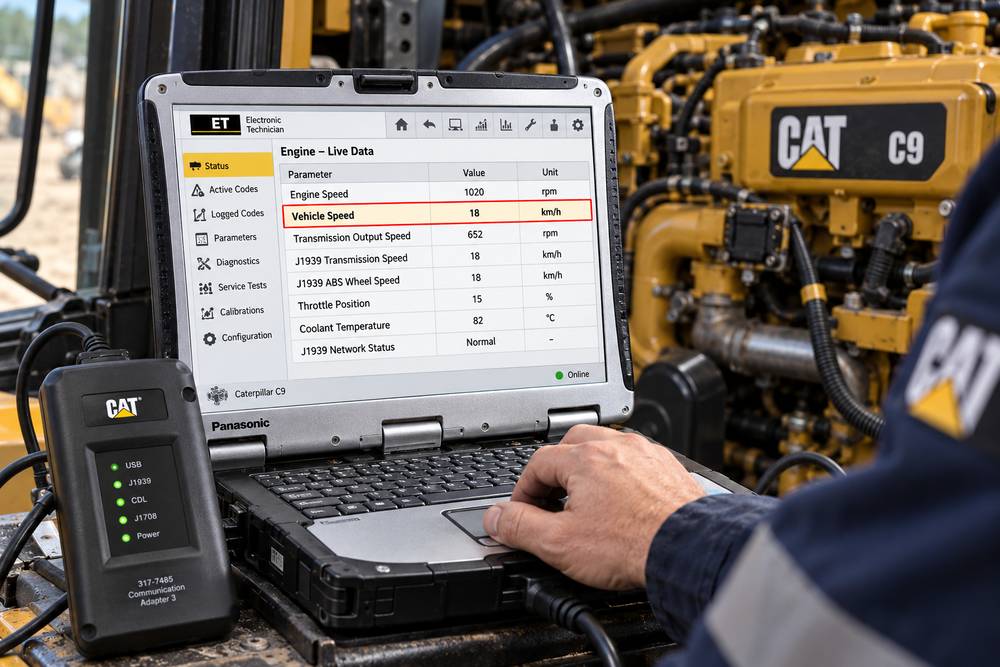
Open the CAT ET status or parameter screen and monitor vehicle speed.
Compare the displayed value with actual vehicle operation.
Look for symptoms such as:
- vehicle speed stays at 0 while driving;
- speed remains fixed at one value;
- speed suddenly jumps;
- displayed speed is much higher or lower than actual speed;
- speed disappears intermittently.
These symptoms help determine whether you have a missing signal, an unstable signal, or a calibration problem.
Step 3: Determine the Vehicle Speed Source
Before testing the sensor, determine how this particular vehicle supplies speed information to the ECM.
Check whether the ECM is configured for:
Hard-wired speed input
or
J1939 transmission/ABS speed information
This distinction is critical.
If the ECM is configured to use J1939 vehicle speed, testing terminals 32 and 33 may not identify the real problem because those inputs may not be used.
Step 4: Inspect the Wiring and Connectors
If the vehicle uses a hard-wired speed signal, inspect the circuit between the electronic speed source and the engine ECM.
Check for:
- damaged insulation;
- broken wires;
- corroded terminals;
- loose pins;
- backed-out connector terminals;
- short circuits;
- aftermarket connections;
- poor previous repairs.
Pay particular attention to the ECM connector and any harness sections located near heat, vibration, or moving components.
Step 5: Check for Unapproved Connections
Inspect the vehicle-speed signal wire for aftermarket equipment such as:
- additional speedometers;
- telematics equipment;
- tracking devices;
- speed limiters;
- fleet-management equipment;
- previously installed accessories.
Connecting another device incorrectly to the vehicle-speed signal circuit can change the signal’s electrical characteristics or introduce noise.
If you find aftermarket wiring, compare it with the chassis manufacturer’s wiring diagram before disconnecting or changing anything.
Step 6: Check the Vehicle Speed Sensor
If the system uses a physical speed sensor, inspect:
- sensor connector;
- sensor power supply, if applicable;
- ground;
- signal output;
- wiring continuity;
- sensor mounting;
- tone wheel or target condition.
Do not replace the sensor simply because PID 84-2 is present.
First, determine whether the sensor is actually the source of the speed information the ECM uses.
Step 7: Check J1939 Communication
If the transmission or ABS controller supplies vehicle speed, inspect the J1939 network.
Look for:
- J1939 communication diagnostic codes;
- missing transmission information;
- missing ABS information;
- intermittent communication;
- damaged twisted-pair wiring;
- connector corrosion;
- poor network termination.
If several control modules report J1939 faults, diagnose the network before focusing on the engine ECM.
Step 8: Verify Vehicle Speed Calibration
Incorrect calibration can cause the ECM to calculate the wrong vehicle speed even when the speed source is functioning correctly.
Check the programmed vehicle-speed parameters in CAT ET.
On J1939 transmission applications, pay particular attention to the Vehicle Speed Cal (J1939-Trans) value.
The correct value depends on the vehicle configuration and may be affected by factors such as:
- transmission output speed;
- axle ratio;
- tire revolutions per mile;
- drivetrain configuration.
Use the correct Caterpillar and chassis service information for the specific vehicle before changing calibration parameters.
Step 9: Road-Test and Monitor CAT ET
After repairing the suspected problem, perform a controlled road test where safe and permitted.
Monitor:
- vehicle speed;
- engine speed;
- transmission output speed if available;
- J1939 communication status;
- active diagnostic codes.
The CAT ET vehicle-speed value should change smoothly and correspond reasonably with actual vehicle speed.
Step 10: Clear the Code and Recheck
After confirming the repair:
- Clear the diagnostic code.
- Cycle the ignition if required.
- Restart the engine.
- Perform another operational test.
- Recheck CAT ET for active or logged faults.
If PID 84-2 immediately returns, continue troubleshooting instead of replacing the ECM without additional testing.
Quick Diagnostic Flow
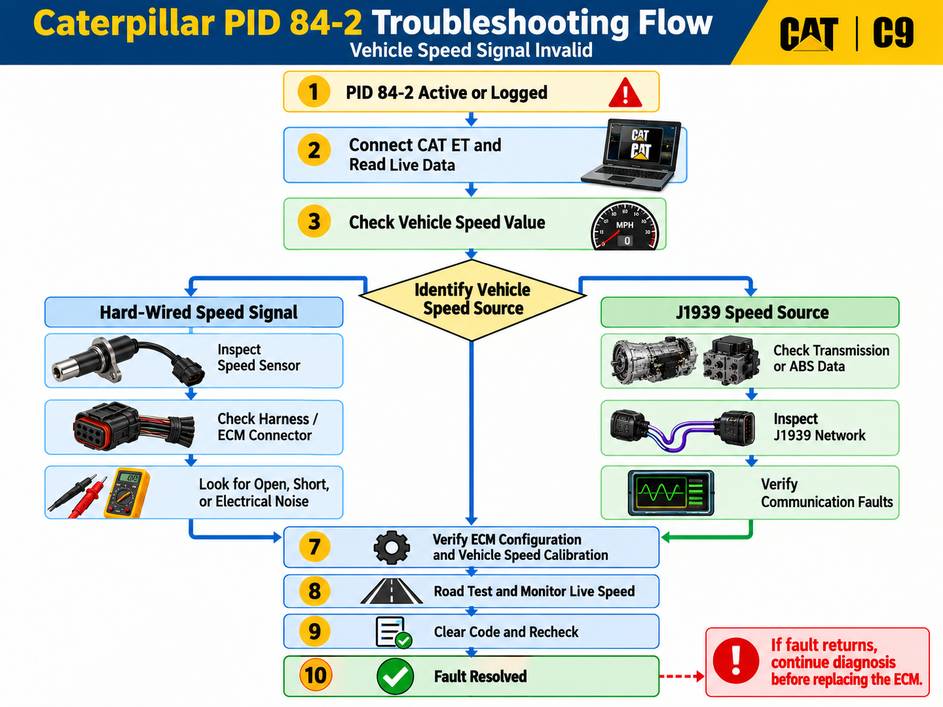
PID 84-2 Vehicle Speed Signal Invalid
↓
Connect CAT ET and monitor vehicle speed.
↓
Identify vehicle speed source
→ Hard-wired signal
→ Transmission J1939
→ ABS J1939
↓
Hard-wired system:
Inspect sensor → harness → ECM connector → calibration
J1939 system:
Inspect network → transmission/ABS data → ECM configuration → calibration
↓
Correct fault
↓
Road-test while monitoring CAT ET
↓
Clear code and confirm that PID 84-2 does not return
Should You Replace the ECM?
Usually, no.
An ECM failure is possible, but it should be investigated only after verifying:
- correct ECM configuration;
- correct speed calibration;
- vehicle speed sensor operation;
- wiring integrity;
- connector condition;
- J1939 communication;
- transmission or ABS speed information.
Replacing an ECM before completing these checks can add unnecessary cost without fixing the original fault.
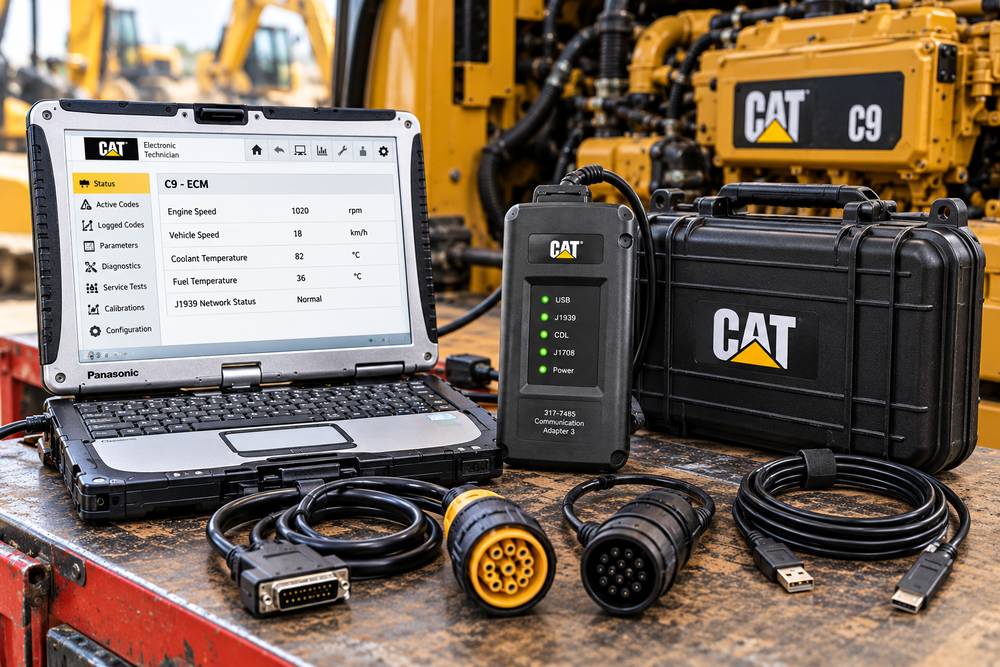
CAT Diagnostic Tool for C9 Troubleshooting
For Caterpillar C9 engine troubleshooting, CAT ET allows technicians to view ECM diagnostic information and live operating parameters. Used with a compatible communication interface, it can help determine whether the speed problem originates from the ECM input, vehicle wiring, calibration, or the J1939 network.
CAT Caterpillar Communication Adapter 3:
Before ordering, confirm the required connector, vehicle application, and software requirements for the machine or truck you plan to diagnose.
FAQ
What does Caterpillar PID 84 mean?
PID 84 relates to vehicle speed information. A PID 84-2 diagnostic code indicates that the ECM considers the vehicle-speed signal incorrect, unstable, or invalid.
Can a bad vehicle speed sensor cause PID 84-2?
Yes, if the vehicle uses that sensor as the ECM’s speed source. However, some Caterpillar C9 installations get speed information from the transmission or ABS controller through J1939, so you shouldn’t automatically blame the sensor.
Can incorrect calibration cause this fault?
Yes. An incorrect vehicle-speed calibration value can cause the ECM to calculate vehicle speed incorrectly even when the physical sensor or J1939 signal is functioning.
What should I check first?
Connect CAT ET and determine what vehicle-speed value the ECM is receiving. Then identify whether the vehicle uses a hard-wired input or J1939 speed source before testing individual components.
Can a J1939 problem cause PID 84-2?
Yes. On vehicles configured to receive speed from the transmission or ABS, missing or incorrect J1939 data can result in an invalid vehicle-speed fault.
Should I replace the Caterpillar ECM for PID 84-2?
Not until you have checked the wiring, sensor, J1939 source, connector condition, and ECM calibration. ECM replacement should normally be one of the final diagnostic steps.
Conclusion
A Caterpillar C9 Code 36 PID 84-2 Vehicle Speed Signal Invalid does not automatically mean the speed sensor or ECM has failed.
The key is first to determine where the ECM gets its vehicle-speed information.
For a hard-wired system, concentrate on the sensor, signal circuit, and ECM connection. For a J1939-based system, check transmission or ABS data, network integrity, and the programmed vehicle-speed calibration.
Using CAT ET to compare live vehicle speed with actual operating conditions can significantly narrow the diagnosis before replacing parts.
Leave a Reply