
What is the Kubota DST-i diagnostic adapter?
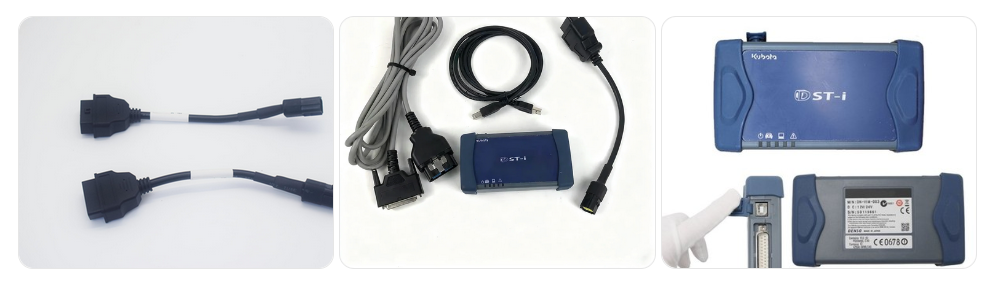
The Kubota DST-i (Diagnostic Service Tool – Interface) is a professional diagnostic adapter used to communicate with Kubota machines. It connects a laptop running Kubota diagnostic software to the machine’s ECU, allowing technicians to diagnose faults, monitor system data, and perform service procedures.
What machines does the Kubota DST-i support?
The DST-i interface is designed to work with many Kubota machines, including:
- Kubota tractors
- Kubota excavators
- Kubota agricultural equipment
- Kubota construction machinery
- Kubota diesel engines used in industrial equipment

The exact compatibility depends on the software version installed on the computer.
Obdii.shop offers the following five configurations.
What software works with the Kubota DST-i adapter?
Common diagnostic software used with the DST-i includes:
- Kubota DiagMaster
- Kubota K-Diag diagnostic software
- Kubota dealer diagnostic programs
These software platforms allow users to access ECU data, perform troubleshooting, and run diagnostic tests.
What functions can the Kubota DST-i perform?
The DST-i adapter provides several diagnostic capabilities, such as:
- Reading and clearing diagnostic trouble codes (DTCs)
- Viewing live data and sensor information
- Performing actuator tests
- Running calibration procedures
- Adjusting ECU parameters
- Resetting service intervals
These features help technicians quickly identify and repair machine issues.
What operating system is required for Kubota DST-i software?
Most Kubota diagnostic software for the DST-i interface works with:
- Windows 7
- Windows 10
Some newer software versions may also support Windows 11, but compatibility depends on the diagnostic package.
How does the Kubota DST-i connect to the machine?
The connection process usually involves:
- Connecting the DST-i adapter to the laptop via USB
- Connecting the diagnostic cable to the Kubota machine
- Running the Kubota diagnostic software on the computer
The adapter communicates with the machine’s ECU using CAN communication protocols.
Can Kubota DST-i read engine fault codes?
Yes. The DST-i diagnostic adapter can access the engine ECU and retrieve:
- Engine fault codes
- Sensor values
- System status information
- Diagnostic logs
This allows technicians to identify engine issues quickly.
Why can’t the Kubota DST-i connect to my machine?
Common connection issues include:
- Incorrect diagnostic cable
- Missing drivers for the adapter
- Unsupported machine model
- Wrong COM port configuration
- USB communication problems
Installing the correct drivers and using the proper software version usually resolves the issue.
Do I need internet access to use Kubota DST-i?
Basic diagnostics can usually be performed offline. However, internet access may be required for:
- Software updates
- Technical documentation
- ECU programming functions
✅ Tip: The Kubota DST-i is mainly used by professional technicians and Kubota equipment service centers to perform accurate diagnostics and maintenance.
Leave a Reply