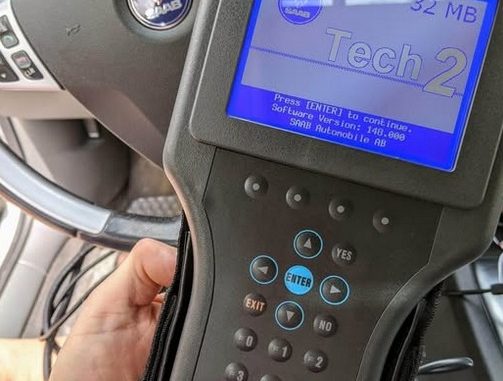
If you work on General Motors, Saab, Isuzu, Suzuki, or Opel/Vauxhall vehicles built between 1991 and 2013, the GM Tech 2 is still the tool to reach for. Hewlett-Packard and Vetronix originally built it, and it talks directly to your vehicle’s control modules using GM’s older Class 2 J1850 VPW and UART protocols. It also handles High-Speed CAN (Controller Area Network) through the CAN Diagnostic Interface (CANDI) module.
GM has since moved to the Multiple Diagnostic Interface (MDI/MDI 2) and PC-based GDS2 software for vehicles from the 2010–2014 era onward. Even so, the Tech 2 is hard to beat on older, pre-global-architecture GM platforms. It’s the go-to for bi-directional actuator tests, module coding, key programming, and sensor recalibrations.
Not sure which tool you need?
If your vehicle is… Choose Listed price* 1992–2014 GM, Saab, Opel, Suzuki, Isuzu, or Holden car GM Tech 2 Scanner with CANdi & TIS2000 From US$198 (+US$43 per software card) 2014 or newer, or a CAN FD / DoIP vehicle MDI2 Diagnostic Interface for GM From US$242 *Prices as listed at the time of writing. Check the product pages for current pricing.
What You’ll Need: The Tech 2 Hardware Setup
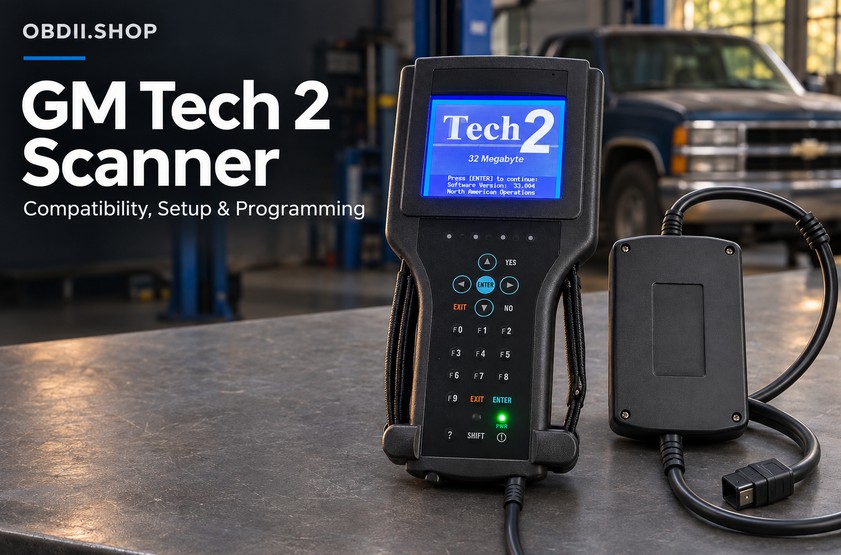
A working Tech 2 setup has three main pieces that connect you to the vehicle:
[Vehicle DLC Port]
       │
[CANDI Module] ── (Required for 2004–2013 CAN-Bus Platforms)
       │
[Tech 2 Handheld Unit] ── [32MB PCMCIA Linear Flash Card]
1. The Tech 2 Handheld Unit
This is the unit you’ll hold. It has a 3.8-inch backlit monochrome screen (320×240 pixels), a membrane keypad, and an internal VCI (Vehicle Communication Interface) cartridge. It runs standalone on the vehicle’s 12V battery power through the DLC cable. For bench testing, you can use an external DC power supply instead.
2. 32MB PCMCIA Linear Flash Cards
The Tech 2 has no built-in storage for vehicle databases. All its operating software lives on a 32MB Type II PCMCIA Linear Flash memory card (AMD silicon architecture).
- One OS per card: A 32MB card holds only one brand’s software at a time. To go from a Chevrolet to a Saab, swap the card physically or flash a new
.binimage with software like CardWriter or Memory Card Explorer (MCE). - Card capacities: Older 10MB cards only support vehicle software up to model year 1998. Anything more modern needs a 32MB card.
| Software Image | Version | Supported Applications |
|---|---|---|
| GM North American Operations (NAO) | v33.004 | Chevrolet, GMC, Cadillac, Buick, Pontiac, Oldsmobile, Saturn, Hummer (1991–2013) |
| Saab | v148.000 | Saab 9-3 (1998–2011), Saab 9-5 (1998–2010) |
| Saab Legacy | v44.000 | Classic Saab 900 (1988–1998), Saab 9000 (1988–1998) |
| Opel / Vauxhall | v180.000 | European GM platforms up to 2014 |
| Isuzu | v107.021 | Rodeo, Trooper, D-Max, Commercial N-Series (4HE1/4HK1) |
| Holden | v149.000 | Australian GM platforms (Commodore, Statesman, Caprice) |
Ordering tip: When you buy the Tech 2 kit (see “What’s in the Tech 2 Box?” below), you pick your software card at checkout: GM, Opel, Saab, Isuzu, Suzuki, or Holden (including an Australia Holden option). Each card is a US$43 add-on, or you can choose “Without Software Card” if you already own one. The listing says the default card language is English. If you need another language, tell the seller after you order.
3. The CANDI Module
The Control Area Network Diagnostic Interface module arrived in 2003. It sits between the Tech 2 main cable and the vehicle’s 16-pin DLC port.
- What it does: It translates high-speed CAN (500 kbps) network signals into something the Tech 2’s internal VCI can read.
- When you need it: Any GM vehicle with GMLAN / CAN architecture (for example, the C6 Corvette, 2007+ GMT900 trucks, and the Cadillac CTS, STS, and XLR).
- Good news: You can leave the CANDI plugged in when you scan older Class 2 J1850 vehicles. It detects the protocol and switches to passive pass-through mode, so it won’t interfere.
What’s in the Tech 2 Box?
You don’t have to hunt down the CANDI module separately. The GM Tech 2 Scanner with CANdi & TIS2000 lists these items:
- Tech 2 handheld tester
- 32MB PCMCIA card (your choice of software)
- CANDI module with instruction sheet
- RS232 cable, user manual, and RS232-DB9 adapter
- DLC cable and DLC loopback adapter
- 12V cigarette lighter power cable and battery power cable
- SAE 16/19 adapter and NAO 12/19 adapter
- TIS2000 CD
Vehicle Compatibility and Diagnostic Procedures
1. Chevrolet Corvette C6 (2005–2013)
The C6 uses high-speed CAN for powertrain and chassis systems, plus Class 2 lines for some interior electronics.
- CANDI module: Mandatory. Without it, the Tech 2 shows a
CAN Bus Communication Failureerror as soon as you pick the chassis or PCM menus. The CANDI comes in the box with the Tech 2 kit. - VES (Variable Effort Steering) and Steering Angle Sensor (SAS) relearn:
The C6 has an active steering assist system managed by the Electronic Brake Control Module (EBCM). If you replace a steering rack, alignment components, or the clockspring, you’ll need to recalibrate. Here’s how:
- Connect the Tech 2 with the CANDI module inline and turn the ignition to RUN (Engine OFF).
- Go to Diagnostics > [Model Year] > Passenger Car > Chevrolet > Y-Body (Corvette) > Chassis.
- Select Steering / Variable Effort Steering (VES) > Special Functions.
- Choose Steering Angle Sensor (SAS) Centering / Relearn.
- Make sure the steering wheel is mechanically centered and level, with the front wheels pointing straight ahead on a flat surface.
- Run the relearn command. The Tech 2 tells the EBCM to store the zero-offset position data.
- Other C6 procedures: The Tech 2 can also run an automated ABS brake bleed (it actuates the ABS solenoids to flush air from the pump pack), Ride Control calibration, and Keyless Remote (FOB) slot programming in the glove box.
Doing this job on a C6? Order the Tech 2 with the GM software card and you have everything for the SAS relearn in one kit.
2. Chevrolet Silverado and GMC Sierra 1500
Whether the Tech 2 works depends entirely on the truck’s platform:
- GMT800 platform (1999–2006, plus the 2007 “Classic”):
- Talks purely over Class 2 Serial Data (J1850 VPW).
- The CANDI module is not required, although it can stay connected in pass-through mode.
- You get full support for 4L60E/4L80E transmission adaptations, CASE relearns (Crankshaft Position Variation), ABS brake bleeds, and HVAC blend door actuator recalibrations.
- GMT900 platform (2007–2013 new body style):
- Built on high-speed GMLAN.
- The CANDI module is mandatory for diagnostics on the engine, transmission, BCM, and airbag systems.
Before you order for a truck: The Tech 2 listing says the standard kit ships with the car adapter and that trucks need an additional truck adapter. Message the seller with your exact model and year first so you get the right cable set.
3. GMC Topkick and Chevrolet Kodiak (C4500 / C5500 / C6500)
The Tech 2 natively supports medium-duty conventional trucks (C-Series) through the North American Operations (NAO) software card:
- Powertrain interrogation: Choose Medium Duty Truck in the main vehicle class menu.
- Duramax (6.6L LGH/LLY/LBZ) and Allison 1000/2000 Series: You get full data stream readout, balance rate monitoring, DPF manual regeneration routines, and transmission fast-learn procedures.
- Caterpillar engines (3126 / C7): If your Topkick has a Cat engine instead of a GM Duramax, powertrain diagnostics use SAE J1708/J1939 heavy-duty protocols. The Tech 2 can’t fully scan Caterpillar engine modules. For full ECM access, you’ll need a specialized tool such as Cat ET (Electronic Technician).
As with the Silverado, confirm the truck adapter requirement with the seller before ordering.
4. Saab Models (9-3 Viggen, 9-3 Sport Sedan, 9-5)
For classic and modern Saabs alike, the Tech 2 is the essential standard tool.
- Saab 9-3 Viggen (1999–2002/2003 Convertible): This uses the classic 9400 chassis. You’ll need the Saab 32MB PCMCIA card loaded with software version 148.000. No CANDI module is required.
- Saab 9-3 Sport Sedan / SportCombi / Turbo4 (2003–2011, 9440 chassis):
- This one runs on an advanced dual high-speed/low-speed CAN-bus network.
- You’ll need the CANDI module to talk to the Trionic 8 ECM, CIM (Column Integration Module), and central electronics.
- Security access and key programming:
GM trucks let you program keys with key-turn timing sequences or direct inputs. Saab 9-3 models from 2003 on work differently. They lock module additions (marriage/divorce) and transponder key learning behind a cryptographic challenge. To clear the immobilizer, connect the Tech 2 to a PC running TIS2000 or GlobalTIS and request temporary “Security Access.” Only then will the Tech 2 write new keys to the CIM. Note: the seller’s listing says the kit’s TIS2000 programming covers GM cars before 2007 only, so confirm Saab key work with them before you buy.
Saab owner? Select the Saab V148 card when you order the Tech 2 kit.
Lighting Controls and BCM Customization
The Tech 2 can reach the Body Control Module (BCM) and change vehicle configuration settings without re-flashing any control units:
- Daytime Running Lights (DRL): Enable or disable the automatic headlight/DRL relay circuit. Availability depends on the country calibration. North American BCMs often block complete DRL removal because of federal motor vehicle safety regulations, but Canadian and Fleet variations can be toggled.
- Perimeter and pathway lighting: Adjust exit delay durations (Off, 30s, 60s, 90s) and approach lighting triggers tied to the keyless entry receiver.
- Auto-lock / unlock sequences: Customize rolling door-lock activation speeds and park-to-unlock states.
- How to get there: Diagnostics > [Year] > [Platform] > Body > Body Control Module (BCM) > Special Functions / Configuration.
Memory Cards, Licensing, and Subscriptions
| Parameter | GM Tech 2 (Original & Repro Units) | GM MDI / MDI 2 |
|---|---|---|
| Subscription Required for Diagnostics? | No. Standalone operation with memory card. | Yes with GM’s official Techline Connect / GDS2 lease. The offline-software MDI2 kit described below doesn’t support an online account, per its listing. |
| Subscription Required for ECU Flashing? | Yes. Requires ACDelco TDS SPS2 account ($45/VIN). | Yes for GM’s official online SPS2 ($45/VIN). |
| Primary Protocol | Class 2 J1850 VPW, UART, High-Speed CAN (via CANDI) | DoIP, CAN-FD, High-Speed CAN, J2534 Pass-thru |
| Target Vehicle Span | 1991 – 2013 | 2010 – Present (Full GDS2 Architecture) |
| PC Dependency | Standalone tool; PC only needed for TIS2000 SPS or card writes | Tethered directly to a Windows PC |
1. Do You Have to Pay for a Subscription?
- For standard diagnostics and actuations: No. Once your 32MB PCMCIA card is programmed with the right bin software (for example, GM NAO 33.004), the Tech 2 needs no internet connection, no licensing server handshake, and no recurring fee.
- For module replacement and ECU calibration (SPS): Yes. If you’re installing a blank ECM, TCM, or BCM, you’ll use the Service Programming System (SPS). That means connecting the Tech 2 to a PC with an RS232 serial cable and buying a single-VIN or fleet subscription through General Motors’ ACDelco TDS portal. For older pre-2007 calibrations, you can use legacy offline TIS2000 databases instead, and the Tech 2 kit includes a TIS2000 CD for that.
- A TIS2000 heads-up from the listing: TIS2000 runs on Windows XP only, and the kit doesn’t include a dongle by default. If you plan to do programming, ask the seller about the TIS2000 USB key.
2. Can One Card Run Multiple Software Types?
No. Each 32MB memory card holds exactly one system image. If you work on both a Chevrolet Silverado and a Saab 9-3, keep two separate 32MB cards: one with GM NAO 33.004 and one with Saab v148.000. Extra cards are a US$43 add-on when you order, so you can add the second card to the same cart.
Newer Than 2013? Meet the MDI 2
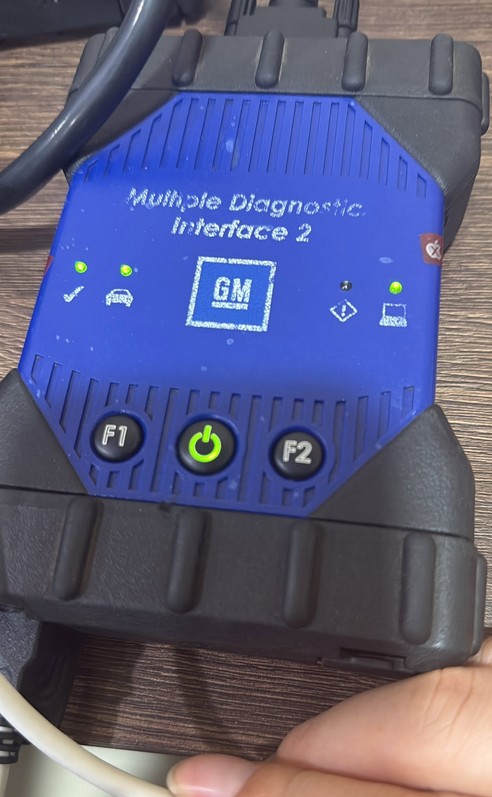
The Tech 2 stops where GM’s global architectures begin. If you also work on 2014+ vehicles, or on anything using CAN FD or DoIP, you need a different tool. The MDI2 Diagnostic Interface for GM is built for that job.
What the listing says it offers:
- Protocols: SAE J2534 Pass-Thru, CAN FD, DoIP, UART, Class 2, KWP2000, and GMLAN (CAN)
- Coverage: GMC, Chevrolet, Buick, Cadillac, and Opel from 1996 to the present, including Global A and Global B platforms
- Software: Works with GDS2, DPS, and Tech2win offline software, and is compatible with Techline Connect (TLC)
- Functions: Diagnosis, offline and online module programming, and key matching
- Connection options: USB, direct Wi-Fi (AP mode), or your local network (Station mode), switchable with a button on the device
- Support: Free maintenance for 1 year
Pick your configuration (hardware price US$242):
| Option | Extra cost | Best for |
|---|---|---|
| Hardware only | – | You already have software and a laptop |
| V2026.02 GDS2 / Tech2win / DPS offline software on a 160GB HDD | +US$60 | Budget-friendly, ready to install |
| Same software on a 256GB SSD | +US$90 | Faster loading |
| Used Lenovo T450 laptop (i5-5200U, 8GB) with the software pre-installed | +US$500 | Plug-and-play kit |
Troubleshooting and Hardware Self-Tests
If communication drops or an error pops up mid-scan, run the Tech 2’s built-in self-tests before you replace any hardware.
1. CANDI Module LED Codes
The CANDI module has a single red status LED:
- Blinking slowly (1 flash/sec): Everything’s normal. The module is working and waiting for data.
- Blinking rapidly: It’s actively communicating with the vehicle’s data network.
- Solid ON or solid OFF: The module has an internal hardware failure, or the DLC isn’t supplying 12V power.
2. VCI Self-Test
If the Tech 2 can’t establish communication with any modules on a vehicle you know is good:
- Unplug the main cable from the car and attach the included Self-Test Adapter (RJ45/loopback plug) to the Tech 2 base.
- Power the unit with the external wall adapter.
- Select Tool Options > Self Test.
- Run the automated VCI test sequence. If any step returns
FAIL, the internal analog-to-digital converter or the transceivers inside the removable VCI cartridge are defective.
Power tip: Turn the ignition on before you connect the Tech 2 to the car. The seller also advises checking battery voltage when the engine starts, because some vehicles with poor grounds can spike in voltage during cranking.
The Bottom Line: Tech 2 or MDI 2?
For 1991–2013 General Motors and Saab vehicles, the Tech 2 is still the best hardware you can get. It runs real-time component actuations, ABS bleeds, steering angle initializations, and transmission adaptations without PC lag. That makes it much more dependable on legacy GM vehicles than modern generic J2534 pass-through devices.
For GM vehicles built from 2014 onward, the Tech 2 is obsolete. Those newer platforms use the Global A and Global B electrical architectures, which need an MDI 2 hardware interface running GM GDS2 and Techline Connect.
| GM Tech 2 with CANdi & TIS2000 | MDI2 (CAN FD / DoIP) | |
|---|---|---|
| Best for | 1992–2014 cars; standalone use | Newer GM, CAN FD/DoIP, 1996–present |
| Needs a PC? | No (only for TIS2000 or card writes) | Yes |
| Software | 32MB card, US$43 per brand | Offline GDS2 / Tech2win / DPS on HDD, SSD, or laptop |
| CANDI included? | Yes | Not needed |
| Listed price | From US$198 | From US$242 |
Work on both older and newer GM vehicles? Many shops keep both: a Tech 2 for 1992–2013 cars and an MDI2 for everything newer.
Ordering Checklist
Before you check out, run through this:
- Vehicle type: Tech 2 is for cars. Trucks need an extra adapter, so ask first.
- Software card: Choose the brand and language you need. Add a second card if you service more than one brand.
- CAN vehicle? The Tech 2 kit includes the CANDI.
- Programming needs: Confirm what’s covered (the listing says GM cars before 2007 with TIS2000, on Windows XP).
- Newer vehicle? Go with the MDI2 and pick HDD, SSD, or laptop.
Shipping and returns (per the listings): Orders ship within 48 working hours of payment, and express delivery is estimated at 5–7 working days. Customs and duties depend on your country. Returns are accepted within 30 days with prior authorization, and defective or wrong-sent items ship back at the seller’s expense. Questions? Email Sales@obdii.shop.
FAQ
Can the Tech 2 read the VIN?
Yes.
Does the Tech 2 work on trucks like the Silverado or Topkick?
The kit ships with the car adapter. Trucks need an additional truck adapter, so confirm with the seller before ordering.
Does the Tech 2 support Saturn?
The seller’s FAQ says no. Our software table lists Saturn under NAO, so check your exact model with the seller.
Do I need an internet connection or a PC?
No for normal diagnostics. A PC is only needed for TIS2000 programming or card writes.
Which MDI2 option should I choose?
Choose hardware-only if you already have software. The HDD or SSD versions come with the offline software pre-installed. The laptop version is ready to use out of the box.
Does the MDI2 handle CAN FD and DoIP?
Yes, per the listing. Those protocols only work with the MDI driver.
Leave a Reply