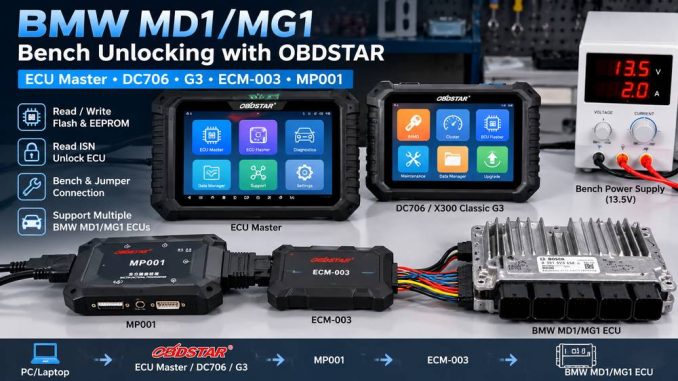
OBDSTAR now supports BENCH operations on several locked Bosch MD1/MG1 ECUs used in newer BMW and MINI vehicles. Depending on the ECU and the OBDSTAR device you use, you can connect either with the dedicated ECM-003 BMW wiring harness or with the standard bench/jumper cable setup.
The important part is not simply connecting power and cables. Before attempting an unlock, read, or write operation, confirm the exact ECU type, use the correct OBDSTAR connection path, maintain stable bench power, and follow the wiring diagram shown in the software.
This guide explains the complete connection workflow for:
- OBDSTAR ECU Master
- OBDSTAR X300 Classic G3
- OBDSTAR DC706
- ECM-003 dedicated BMW bench harness
- Direct jumper-wire BENCH connection
It also covers the most common causes of ECU communication failure, incorrect wiring, and interrupted read/write operations.
Quick Answer: Which Connection Do You Need?
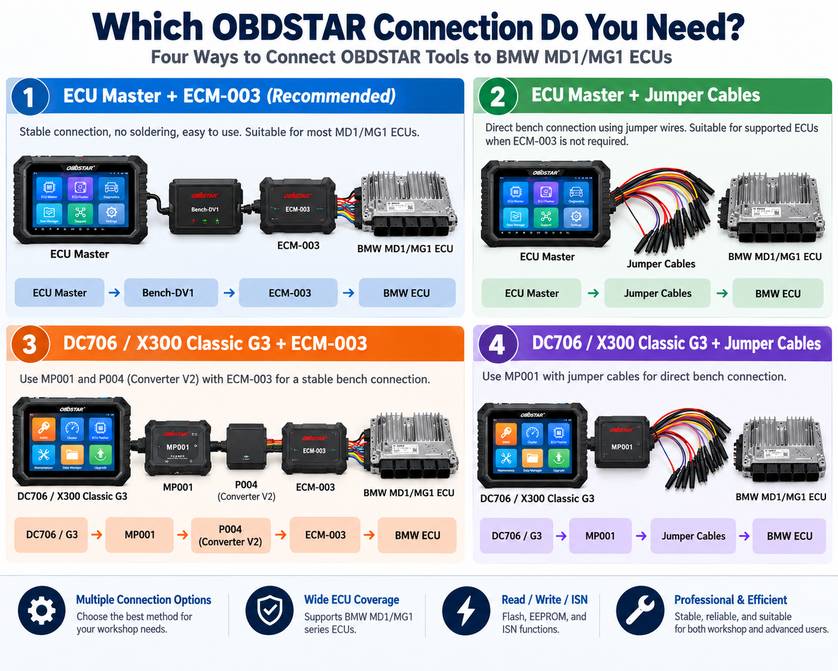
Use this table before assembling the bench setup.
| OBDSTAR Tool | ECM-003 Method | Jumper Method | Additional Hardware |
| ECU Master | Yes | Yes | Bench-DV1 for ECM-003 |
| X300 Classic G3 | Yes | Yes | MP001 + Converter V2/P004 for ECM-003 |
| DC706 | Yes | Yes | MP001 + Converter V2/P004 for ECM-003 |
For workshops that regularly work on supported BMW B48/B57/B58 ECUs, the ECM-003 harness is generally the cleaner connection method because it reduces manual pin-to-pin wiring.
The jumper method remains useful when the ECU is supported by OBDSTAR software but is not covered by the dedicated ECM-003 connector.
Which BMW MD1/MG1 ECUs Does OBDSTAR Support?
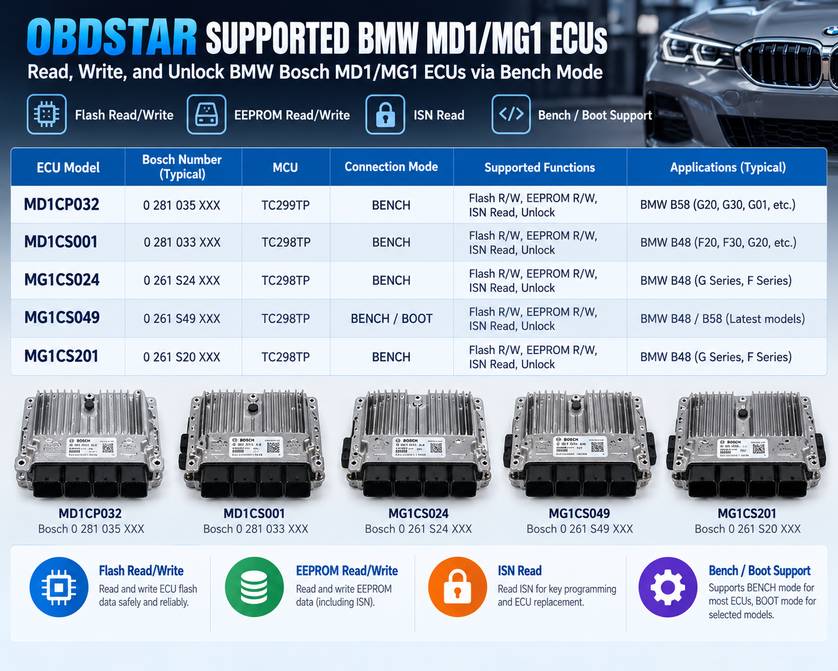
OBDSTAR’s August 31, 2026 ECM V33.40 update lists BENCH support for the following locked BMW Bosch ECUs:
| Bosch ECU | MCU | Mode | Functions |
| MD1CP032 | TC299TP | BENCH | Flash R/W, EEPROM R/W, ISN read |
| MD1CS001 | TC298TP | BENCH | Flash R/W, EEPROM R/W, ISN read |
| MG1CS024 | TC298TP | BENCH | Flash R/W, EEPROM R/W, ISN read |
| MG1CS049 | TC298TP | BENCH/BOOT | Flash R/W, EEPROM R/W, ISN read |
| MG1CS201 | TC298TP | BENCH | Flash R/W, EEPROM R/W, ISN read |
Checksum support is also listed for these applications.
Do not select an ECU simply because the vehicle uses a B48, B57, or B58 engine. BMW may use different ECU hardware or software depending on production date and application.
Always identify the Bosch ECU number and MCU before connecting.
What Does the ECM-003 Harness Support?
OBDSTAR specifically documents the ECM-003 harness for BMW B48/B57/B58 applications using:
- Bosch MD1CP032 TC299TP
- Bosch MG1CS024 TC298TP
- Bosch MG1CS201 TC298TP
It supports ECU data read/write and ISN reading, including supported locked ECUs from 2021 and later.
For other supported ECUs such as MD1CS001 or MG1CS049, check the current OBDSTAR wiring diagram and use the appropriate bench/jumper connection when required.
Before Connecting the ECU
A few minutes of preparation can prevent a failed read or, worse, an interrupted ECU write.
1. Confirm the Exact ECU
Check the ECU label and compare:
- Bosch ECU model
- Hardware number
- MCU type
- BMW application
- Engine family
Then select the same ECU inside the OBDSTAR software.
Do not assume that two ECUs that look physically identical use the same pinout.
2. Update the OBDSTAR Software
Make sure the device has the required ECU software and authorization.
The BMW locked MD1/MG1 functions are relatively new, so an older software package may identify the ECU but not provide the correct BENCH unlock protocol.
3. Use Stable Bench Power
An unstable power supply can interrupt communication during:
- ECU identification
- Unlocking
- Flash reading
- EEPROM reading
- Flash writing
- Checksum processing
Use a regulated bench supply or suitable battery stabilizer and follow the voltage/power requirements shown by OBDSTAR for the selected ECU.
Do not disconnect power during a read or write operation.
4. Inspect the ECU Connector
Before applying power:
- Inspect pins for bending or corrosion.
- Make sure connectors are fully seated.
- Check that no jumper terminals are touching adjacent pins.
- Verify every power, ground, CAN, and control connection against the OBDSTAR diagram.
Apply power only after you have checked the wiring.
Method 1: Connect OBDSTAR ECU Master with ECM-003
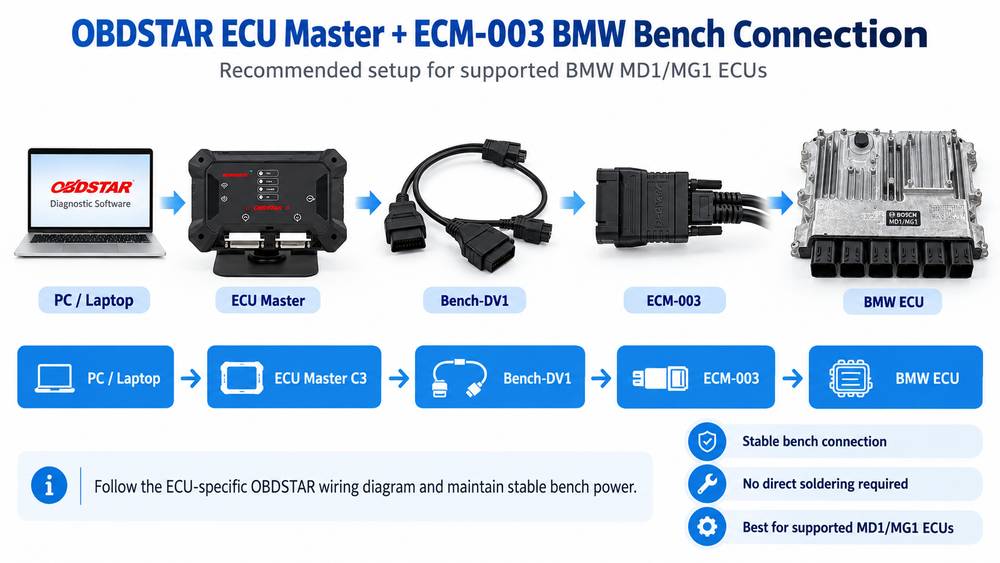
For compatible BMW B48/B57/B58 ECUs, the ECM-003 harness provides the most straightforward ECU Master setup.
Required Tools
You will need:
- OBDSTAR ECU Master
- ECM-003 BMW bench adapter
- Bench-DV1 cable
- USB cable
- Suitable power supply
- Supported BMW Bosch ECU
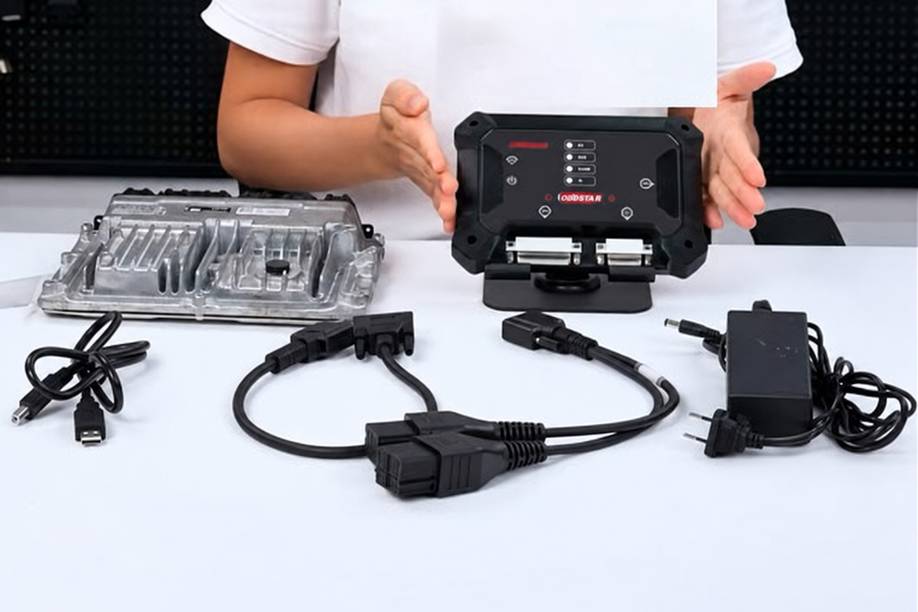
The original connection sequence uses the ECU Master, Bench-DV1 cable, and ECM-003 adapter.
Step 1: Connect ECU Master to the PC
Connect the ECU Master to the computer using the USB cable.
Confirm that:
- The device powers on correctly.
- Windows recognizes the interface.
- OBDSTAR software can communicate with the ECU Master.
Do this before connecting the ECU so you can separate a PC/device problem from an ECU communication problem.
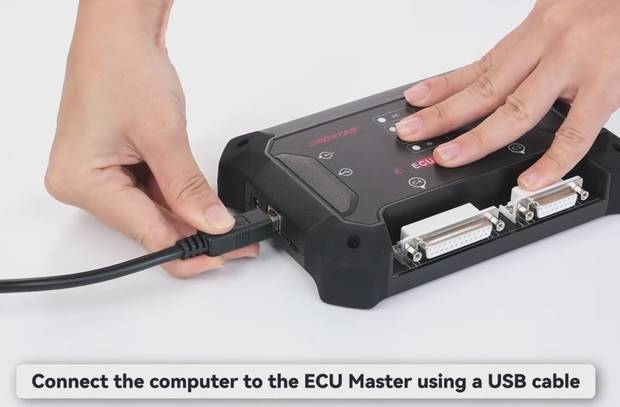
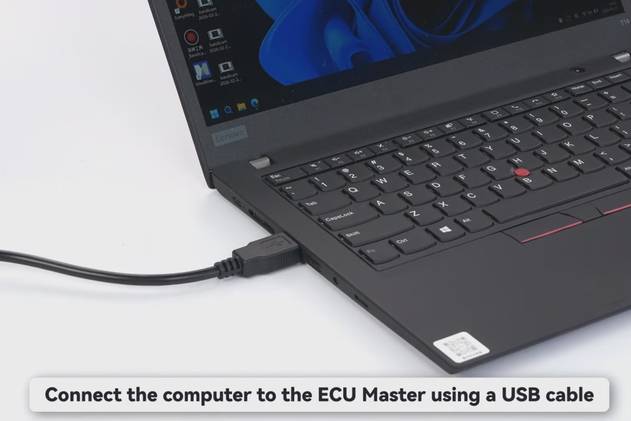
Step 2: Connect Bench-DV1 to ECU Master C3
Locate the C3 connector on the ECU Master.
Connect the Bench-DV1 cable securely to C3.
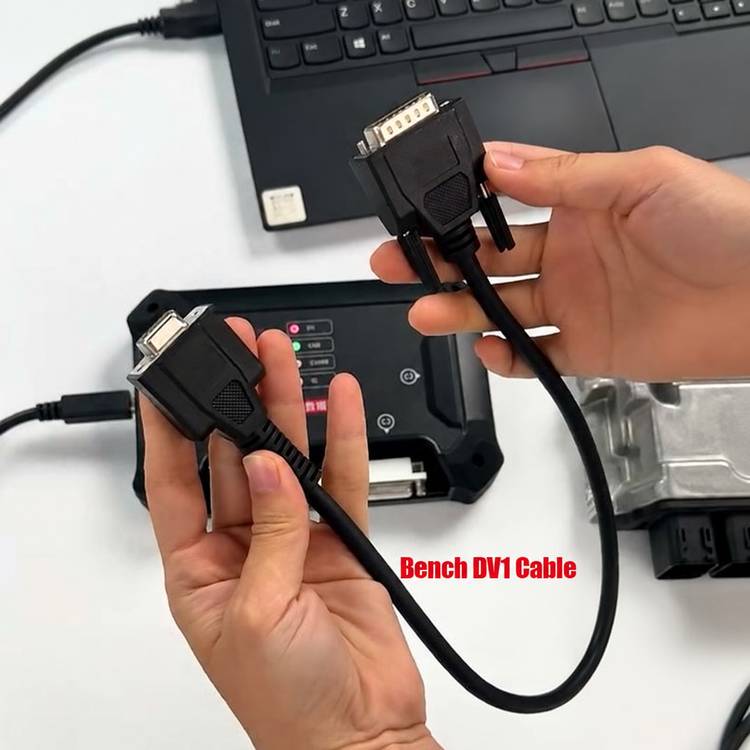
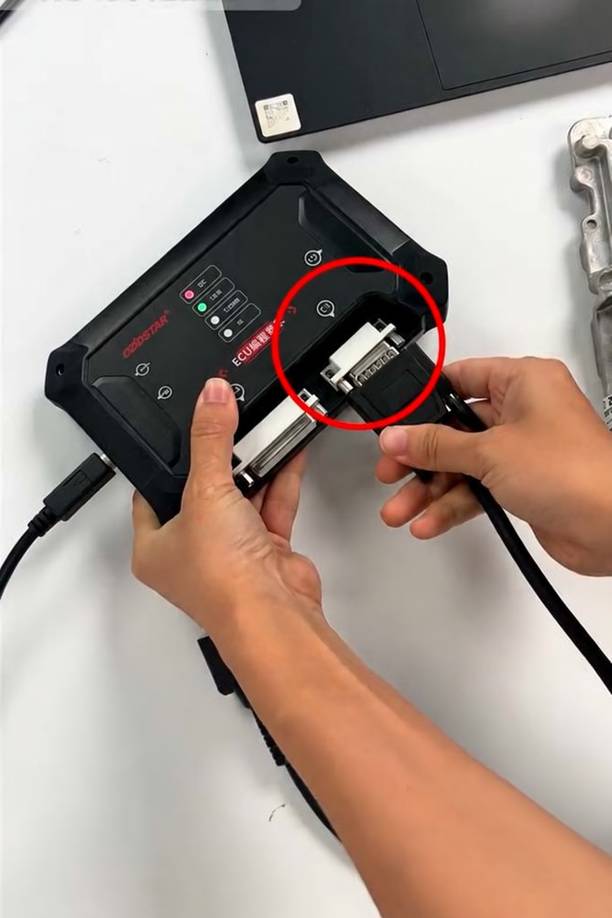
Do not force the connector. Check its orientation before inserting it.
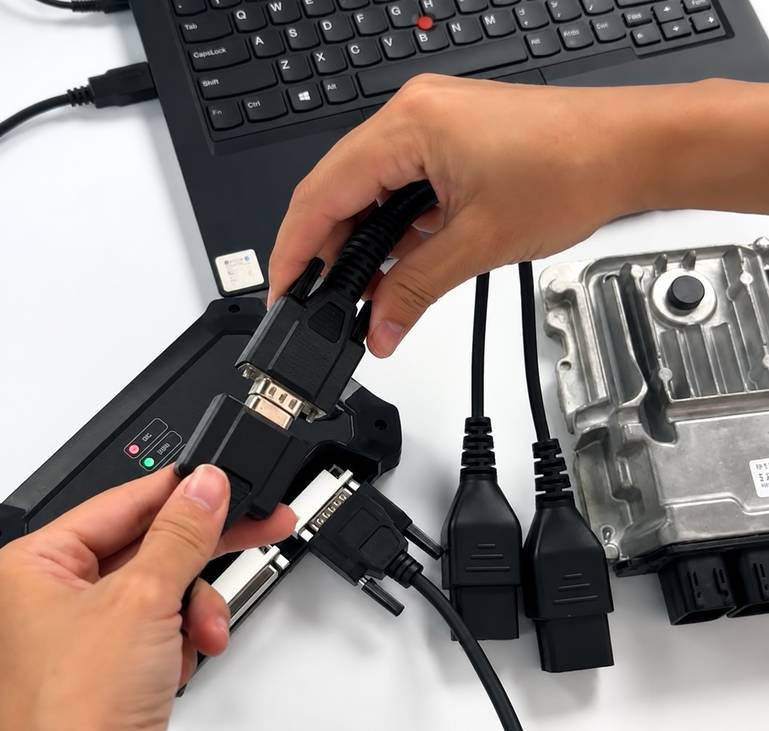
Step 3: Connect Bench-DV1 to ECM-003
Connect the opposite side of the Bench-DV1 cable to the ECM-003 wiring harness.
The connection chain should now be:
PC → USB → ECU Master → C3 → Bench-DV1 → ECM-003
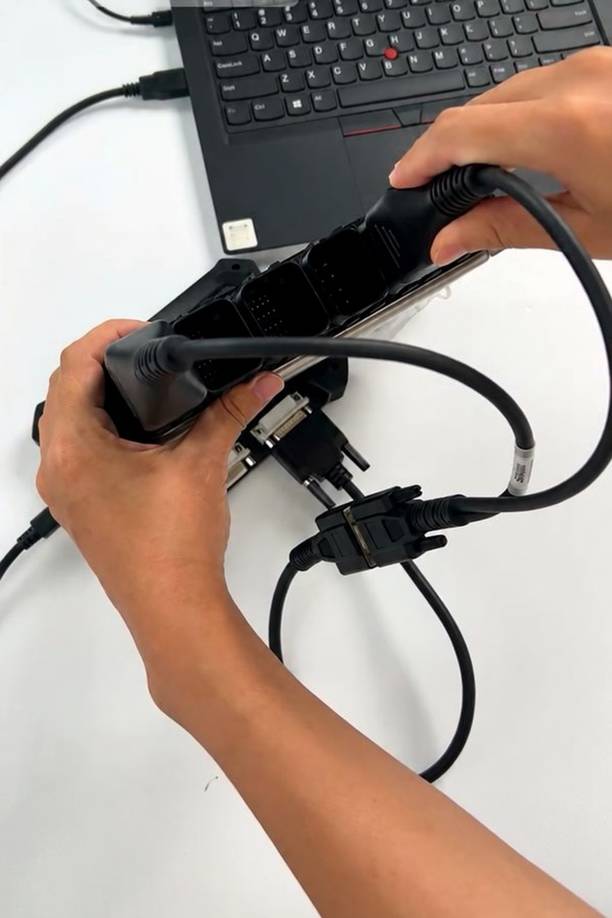
Step 4: Connect ECM-003 to the BMW ECU
Connect the appropriate ECM-003 connector directly to the ECU.
Make sure the connector is fully locked in place before applying power.
Step 5: Connect the Power Supply
Connect the power supply to the ECU Master as required by the OBDSTAR setup.
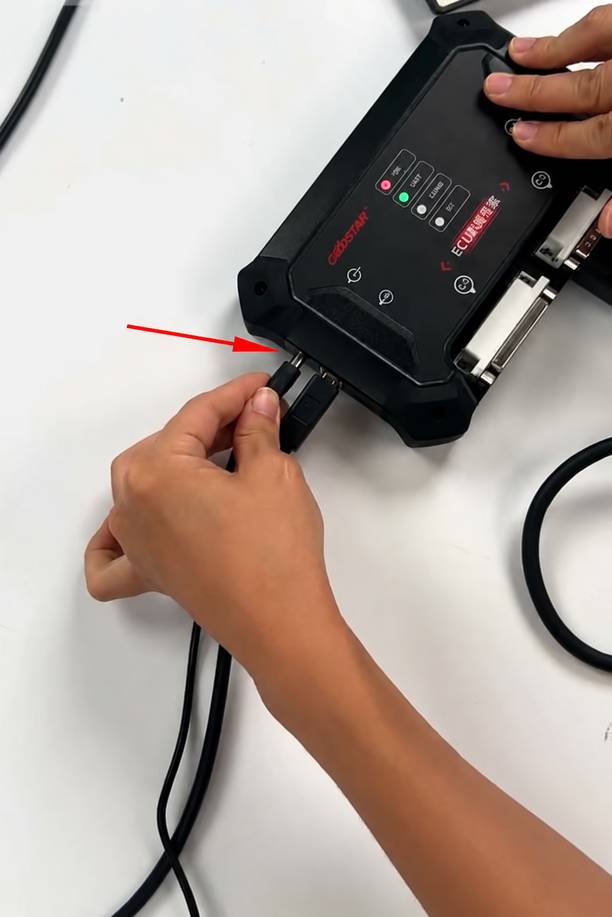
At this point, the bench hardware is ready.
Before writing anything, identify the ECU first.
A good workflow is:
Identify ECU → establish communication → read original data → save backup → perform required unlock operation → verify communication → write only when necessary
Method 2: Connect ECU Master with Jumper Cables
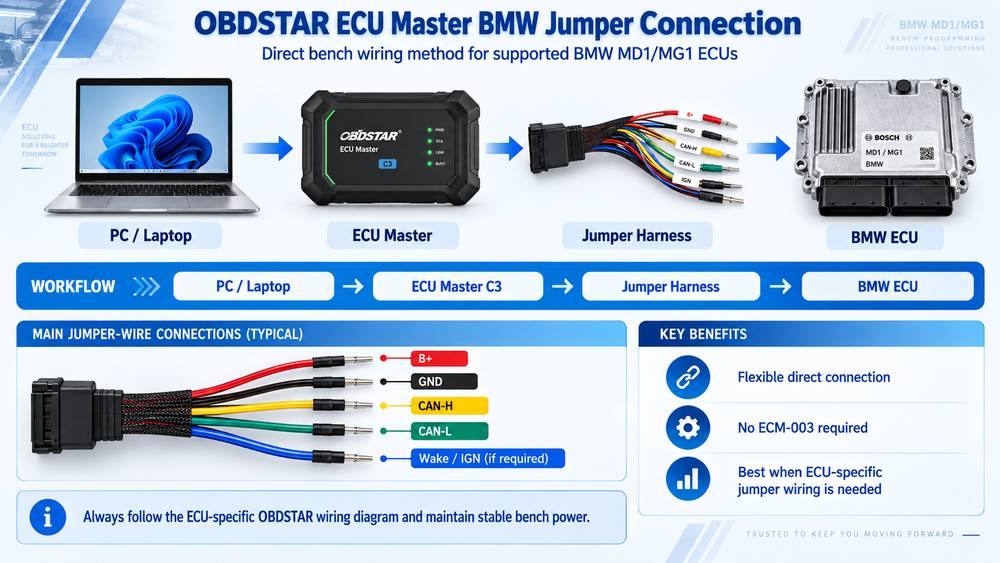
Use a direct jumper-wire setup when following an OBDSTAR BENCH pinout instead of the ECM-003 dedicated harness.
Required Tools
You will need:
- OBDSTAR ECU Master
- 3-in-1 jumper cable
- Bench jumper cable
- USB cable
- Stable power supply
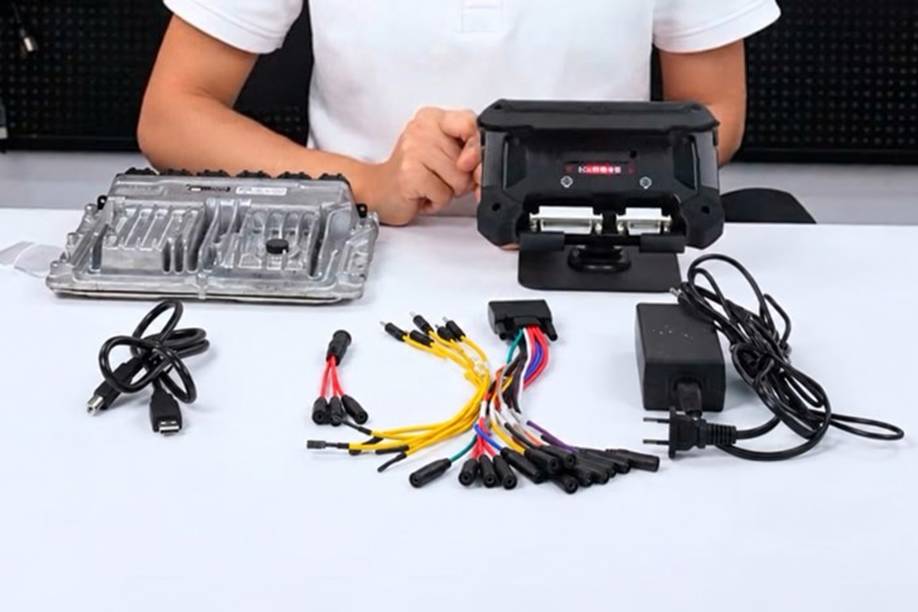
Step 1: Connect ECU Master to the Computer
Connect ECU Master to the PC through USB and verify that the software detects the device.
Step 2: Connect the Bench Jumper Cable
Connect the bench jumper cable to the C3 connector on the ECU Master.
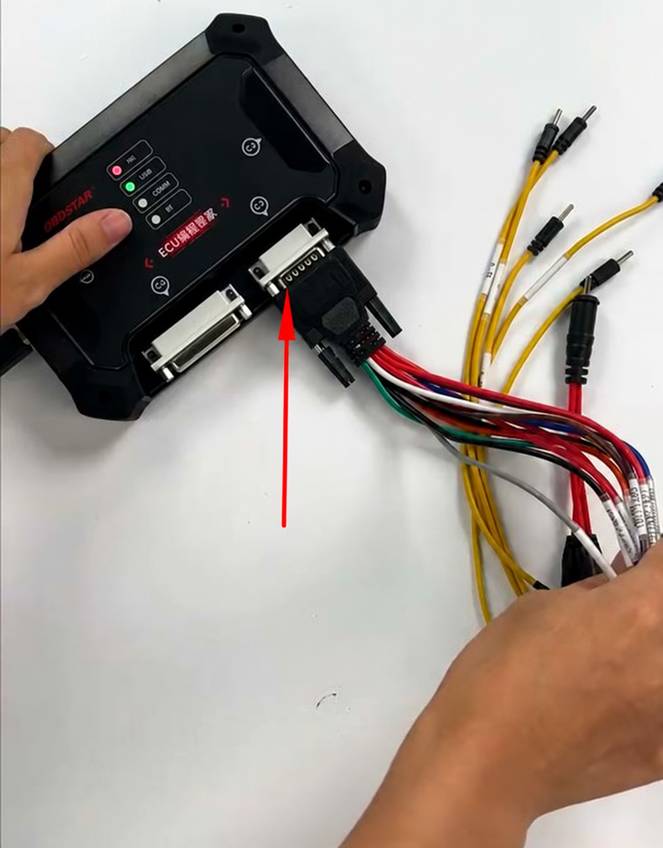
Step 3: Wire the ECU According to the OBDSTAR Diagram
Select the exact ECU in the software and display its connection diagram.
Then connect the jumper leads to the ECU exactly as indicated.
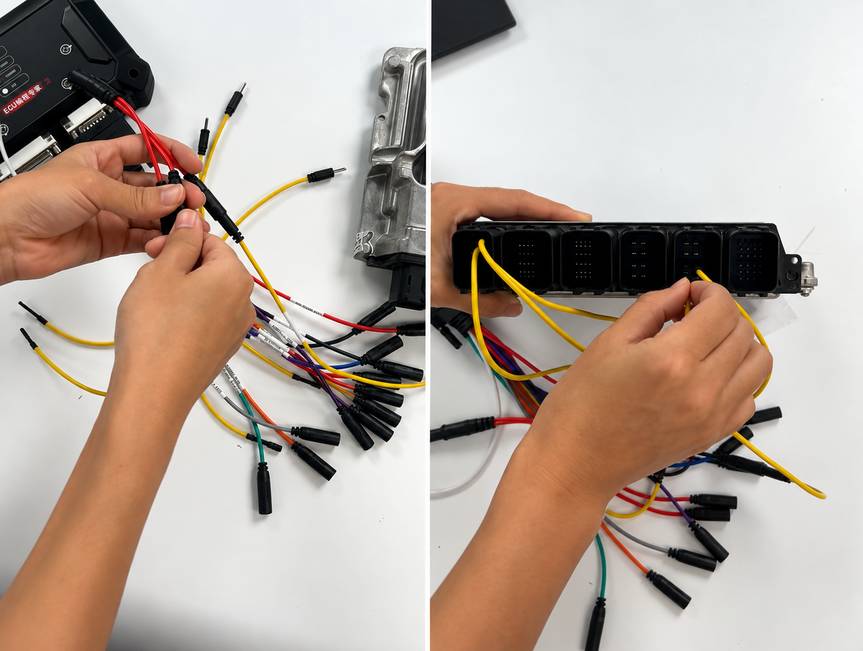
This is where most manual bench-connection mistakes happen.
Pay particular attention to:
- B+
- Ground
- Ignition/wake-up
- CAN High
- CAN Low
- Any ECU-specific control or boot connection shown by OBDSTAR
Never reuse a pinout from another MD1/MG1 ECU simply because the connector housing looks similar.
Step 4: Connect Bench Power
Connect the power supply only after checking all jumper positions.
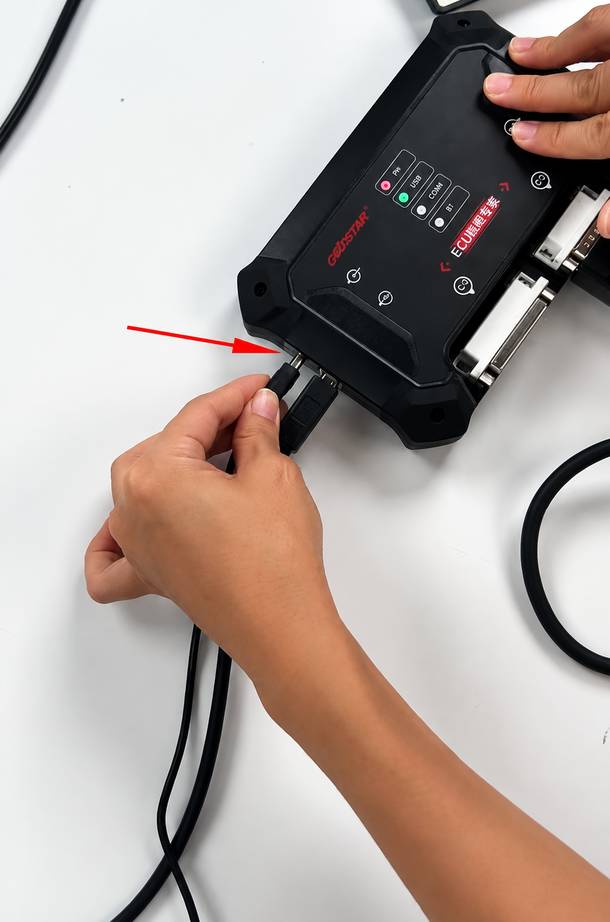
The ECU Master should now be ready to identify and communicate with the ECU.
Connecting OBDSTAR X300 Classic G3 or DC706
The X300 Classic G3 and DC706 use the same hardware connection path for this BMW BENCH workflow.
The key difference from ECU Master is the use of the MP001 programmer.
Method 3: G3/DC706 + MP001 + ECM-003
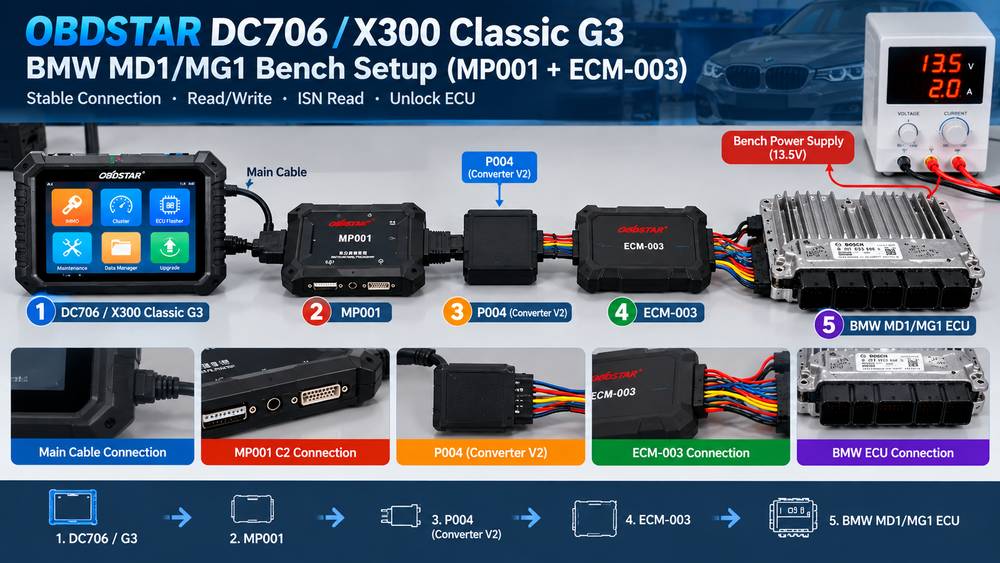
Required Tools
Prepare:
- OBDSTAR X300 Classic G3 or DC706
- Main cable
- MP001 programmer
- Converter V2 or P004 adapter
- ECM-003 BMW bench adapter
- Suitable battery stabilizer or bench power supply
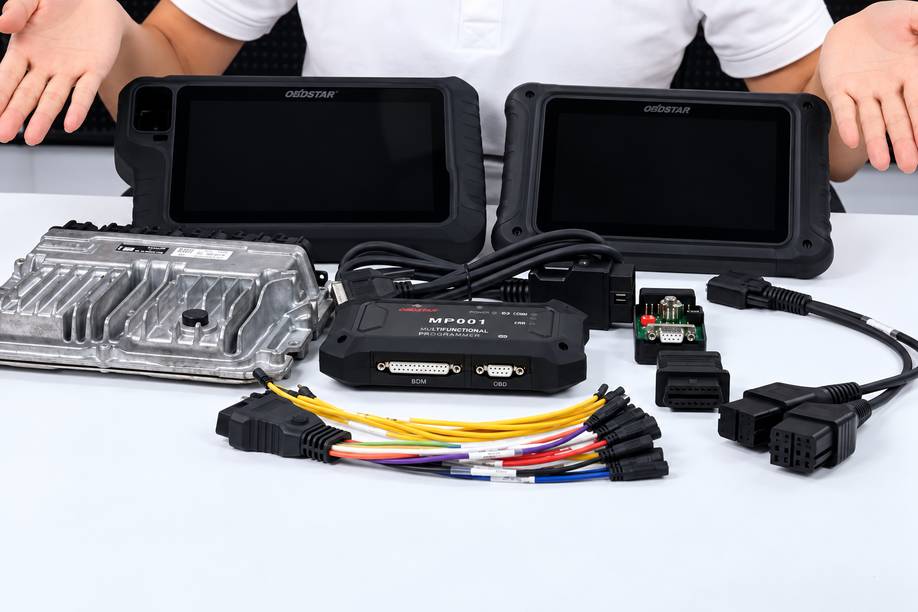
The hardware chain described in the original connection instructions is G3/DC706 → MP001 → Converter V2/P004 → ECM-003 → ECU.
Step 1: Connect G3/DC706 to MP001
Connect the X300 Classic G3 or DC706 to the MP001 programmer using the main cable.
Make sure the connector is fully seated.
Step 2: Connect Converter V2 or P004
Connect the Converter V2 or P004 adapter to the C2 connector on the MP001.
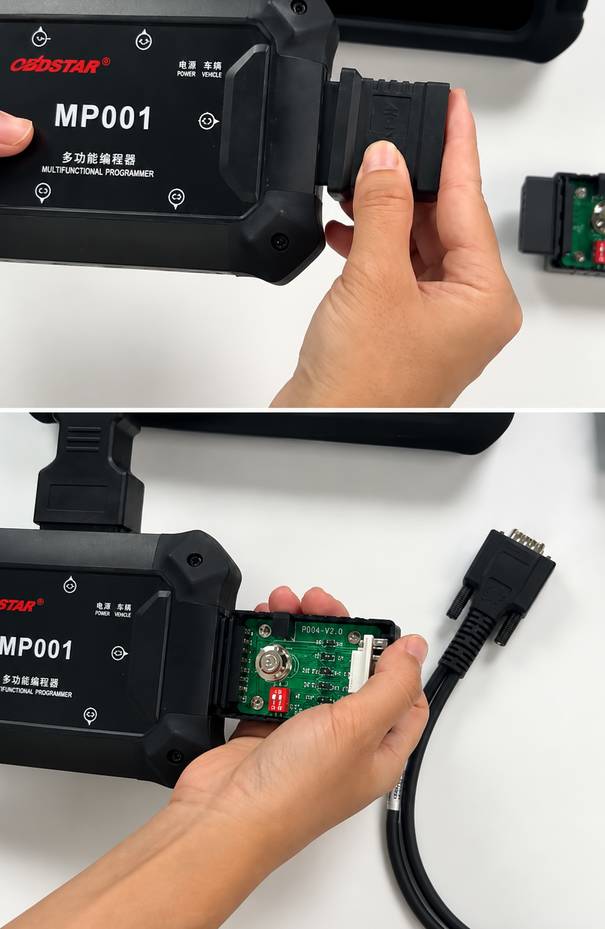
This converter is important when using the ECM-003 harness with the G3/DC706 setup.
Step 3: Connect the ECM-003 Adapter
Connect ECM-003 to the Converter V2 or P004.
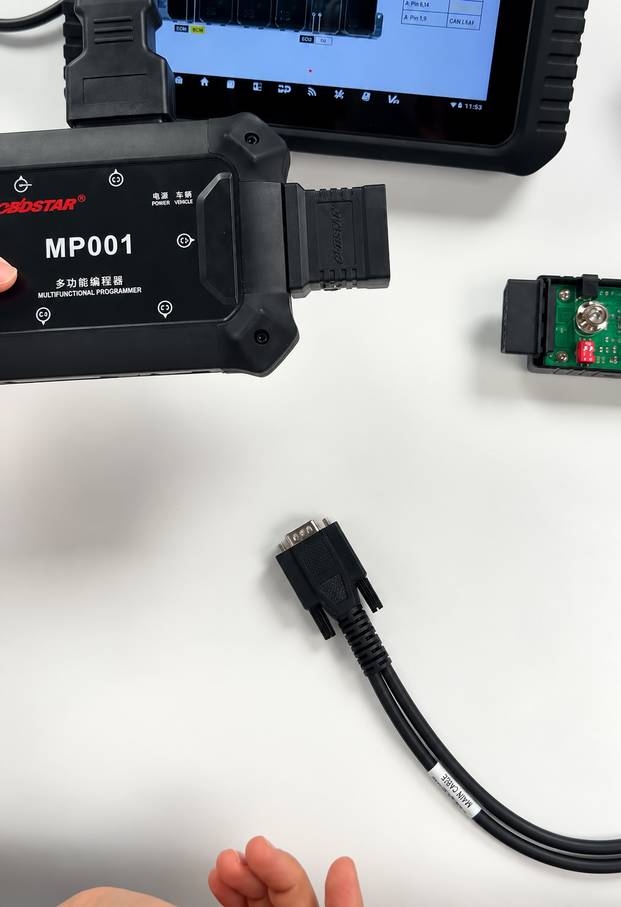
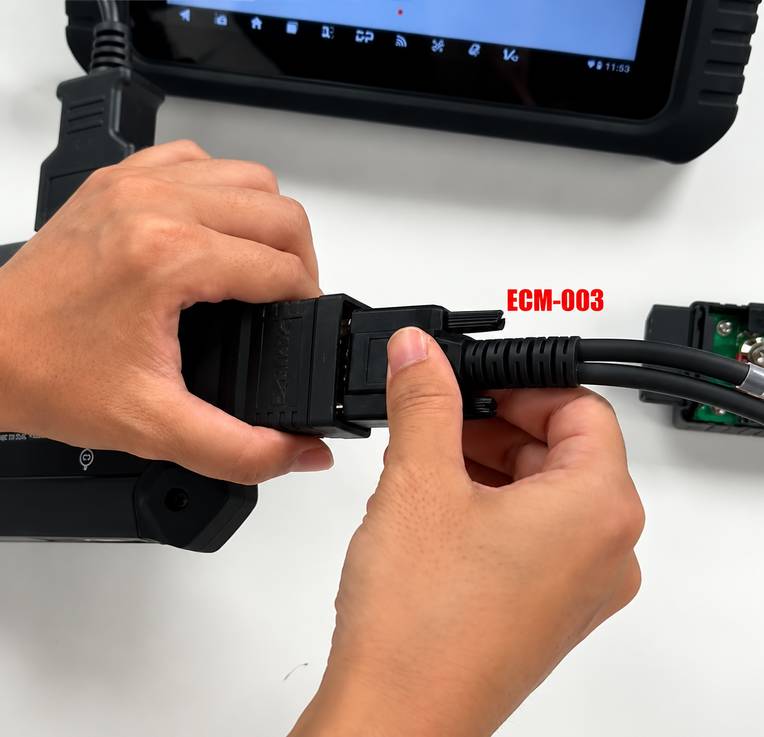
Your connection path should now be:
G3/DC706 → Main Cable → MP001 C2 → Converter V2/P004 → ECM-003
Step 4: Connect ECM-003 to the ECU
Fit the ECM-003 connector to the supported BMW Bosch ECU.
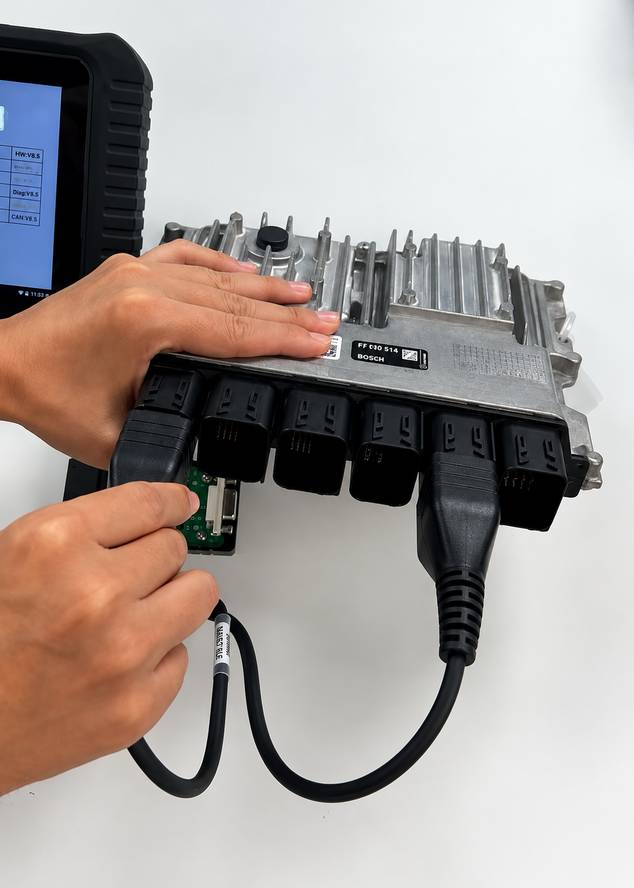
Inspect the connector once more before applying power.
Step 5: Connect Stable Power
Connect the battery stabilizer or regulated supply to the main cable, following the OBDSTAR setup.
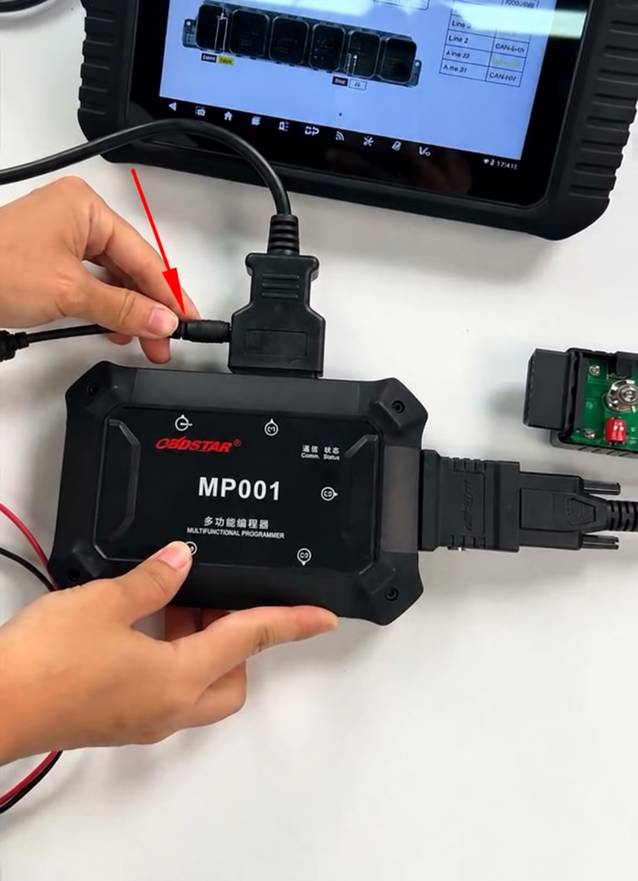
The system is now ready for ECU identification and the supported BENCH procedure.
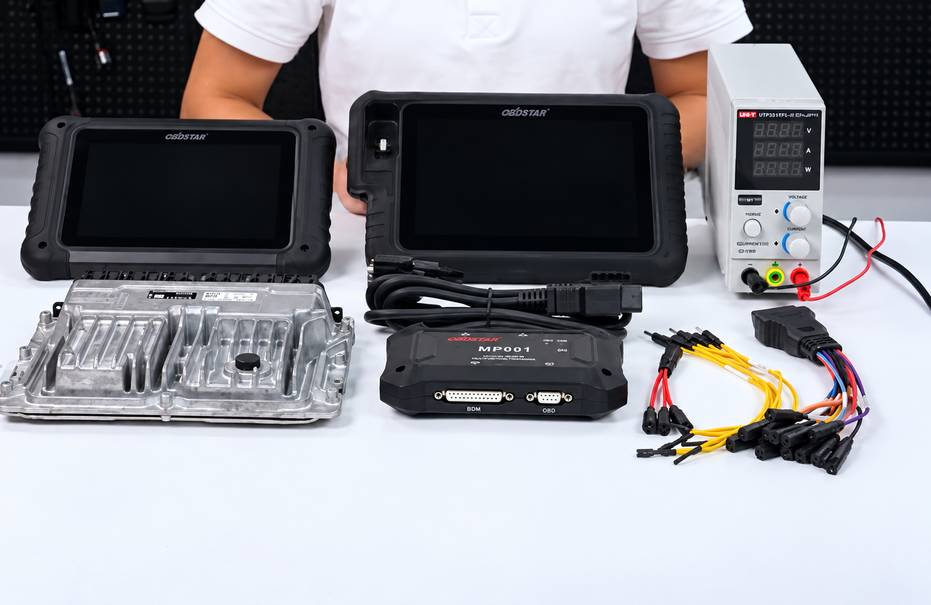
Method 4: G3/DC706 + MP001 + Jumper Cables
The jumper connection avoids the ECM-003 harness and follows the pinout supplied by the OBDSTAR software.
Required Tools
You will need:
- X300 Classic G3 or DC706
- Main cable
- MP001 programmer
- 3-in-1 jumper cable
- Bench jumper cable
- Stable power supply/battery stabilizer
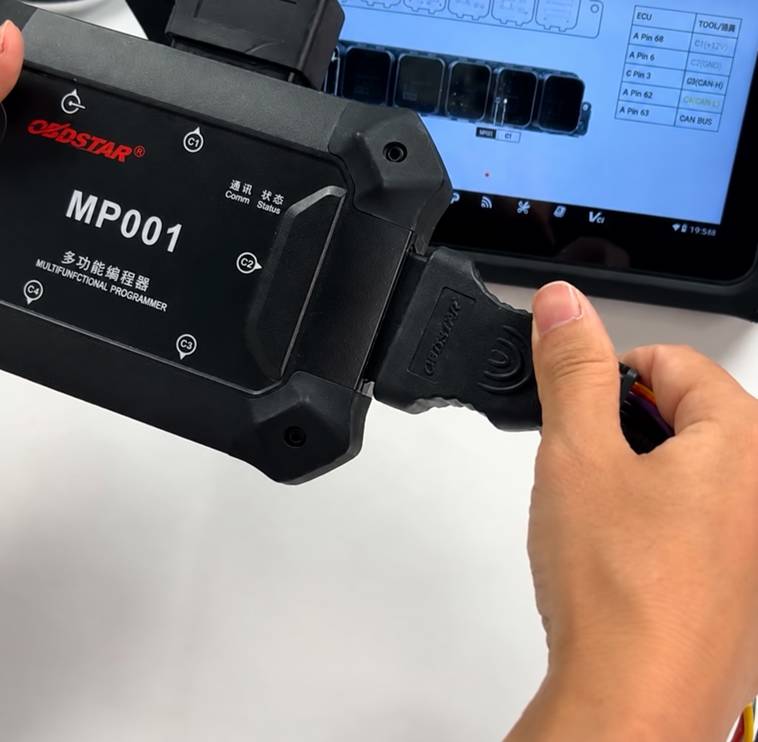
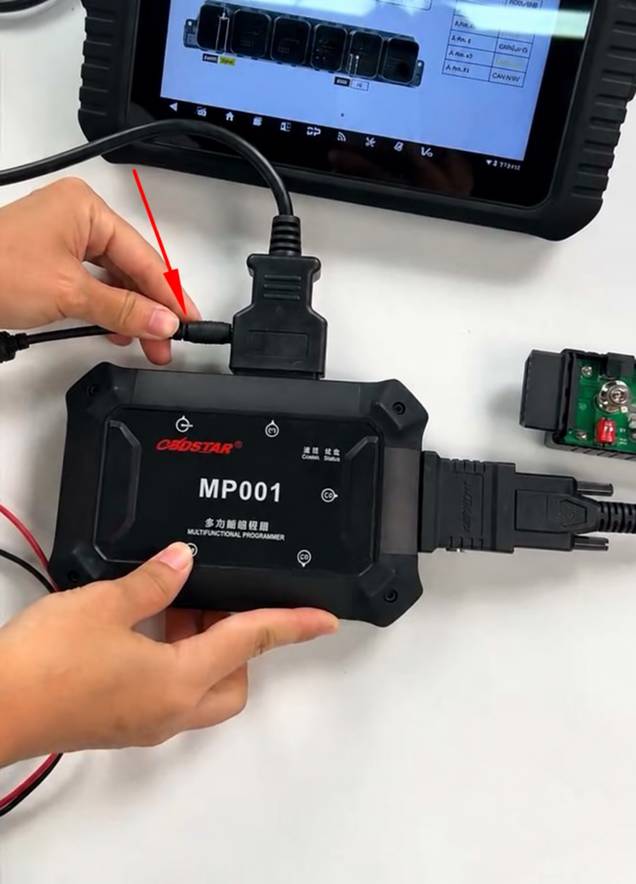
Step 1: Connect G3/DC706 to MP001
Connect the diagnostic tablet/programmer to MP001 using the main cable.
Step 2: Connect the Jumper Harness to MP001 C2
Connect the required jumper harness to MP001’s C2 port.
G3-DC706–MP001-Jumper-Cables-2
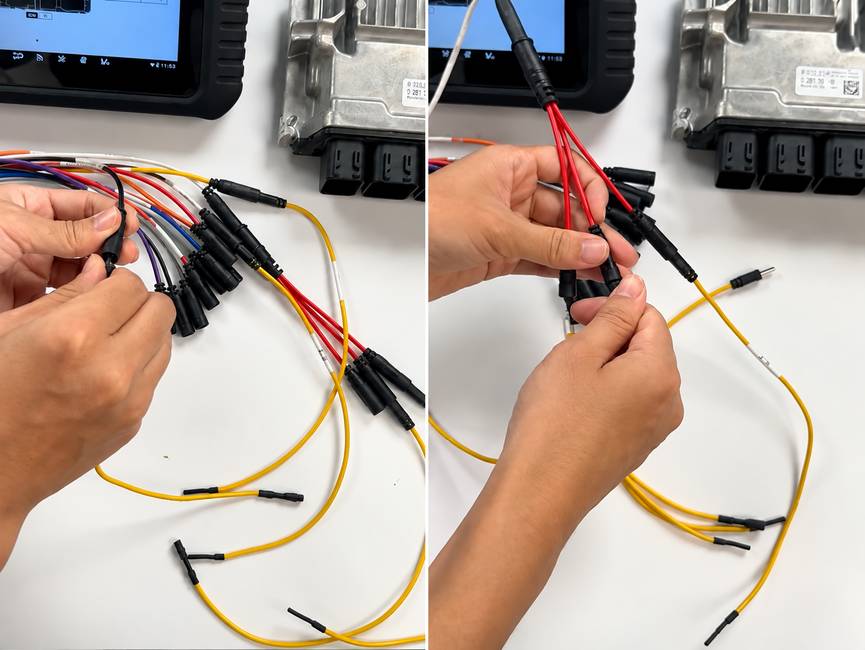
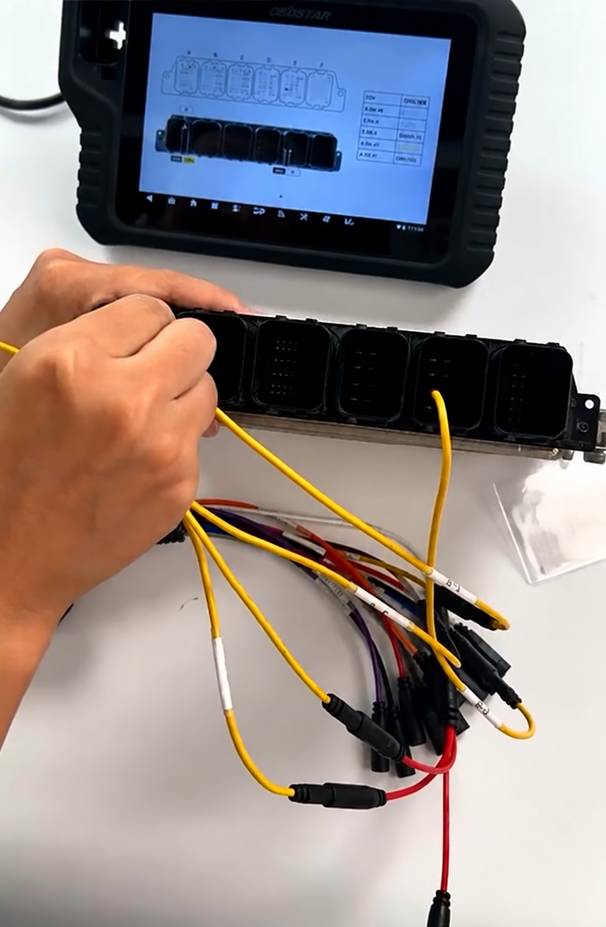
Step 3: Wire the ECU
Open the wiring diagram for the exact ECU selected in OBDSTAR software.
Connect every jumper to the specified ECU terminal.
G3-DC706–MP001-Jumper-Cables-3
G3-DC706–MP001-Jumper-Cables-4
Check the wiring twice before powering the ECU.
Reversed power or an incorrect jumper connection can cause communication failure and may damage the ECU or programmer.
Step 4: Connect the Power Supply
Connect stable power through the main cable as specified by OBDSTAR.
G3-DC706–MP001-Jumper-Cables-5
The G3/DC706 setup should now be ready for BENCH communication.
How to Verify the Connection Before Unlocking
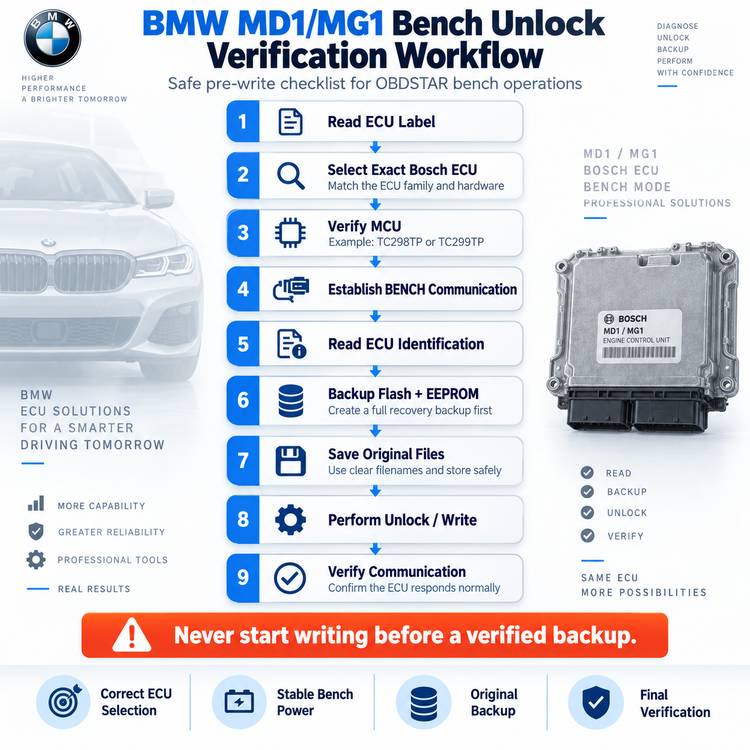
Do not begin a write operation immediately after assembling the cables.
Use this verification sequence first.
1. Identify the ECU
Run ECU identification.
Confirm that the displayed ECU family matches the physical label.
If identification fails, stop and troubleshoot the connection rather than repeatedly attempting an unlock.
2. Check MCU and Protocol
Make sure the selected entry matches the actual controller, for example:
- MD1CP032 TC299TP
- MD1CS001 TC298TP
- MG1CS024 TC298TP
- MG1CS049 TC298TP
- MG1CS201 TC298TP
Choosing the wrong protocol is one of the easiest ways to create an unnecessary programming problem.
3. Read Before Writing
Whenever the software allows it, save the original ECU data before modifying anything.
At minimum, retain clearly named copies of the original:
- Flash
- EEPROM
- ECU identification
- Other backups provided by the software
For example:
BMW_G20_MG1CS201_ORIGINAL_FLASH.bin
Using descriptive filenames is much safer than accumulating files named read1.bin, read2.bin, and new.bin.
4. Keep Power Connected
Once an unlock, erase, checksum, or write process begins:
Do not disconnect the ECU, programmer, USB connection, or power supply unless the OBDSTAR software specifically instructs you to do so.
OBDSTAR Cannot Communicate with the BMW MD1/MG1 ECU: What to Check
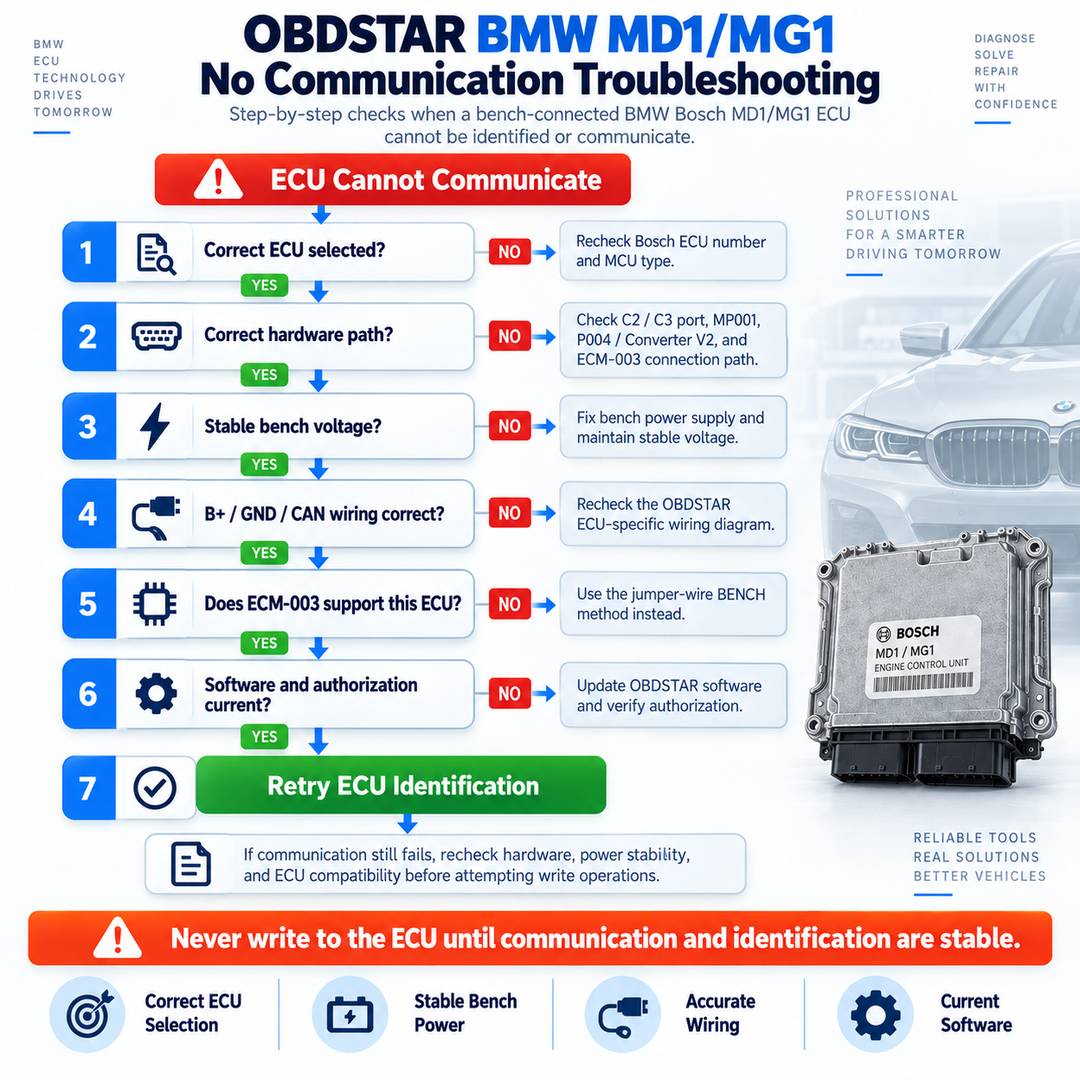
If the tool reports communication failed, connection failed, or cannot identify the ECU, follow these checks instead of repeatedly retrying.
1. Verify the ECU Selection
Confirm the exact Bosch ECU model and MCU.
Do not automatically use a Bosch MD1CP032 connection diagram for an MD1CS001 simply because both are MD1-generation ECUs.
2. Check the Connection Chain
For ECU Master with ECM-003:
ECU Master C3 → Bench-DV1 → ECM-003 → ECU
For G3/DC706 with ECM-003:
G3/DC706 → MP001 C2 → Converter V2/P004 → ECM-003 → ECU
Missing the converter or using the wrong MP001 port can prevent communication.
3. Inspect Bench Power
Check whether the ECU supply voltage remains stable when communication starts.
A supply that appears correct with no load may drop when the ECU wakes up.
4. Recheck CAN and Power Pins
With a jumper setup, verify:
- B+
- Ground
- CAN-H
- CAN-L
- Ignition/wake-up
- ECU-specific pins shown in the software
A single misplaced lead can prevent communication.
5. Check the ECM-003 Application
The dedicated ECM-003 documentation specifically lists MD1CP032, MG1CS024, and MG1CS201.
If you are working with another supported BMW ECU such as MD1CS001 or MG1CS049, verify whether the software requires the jumper-wire BENCH method instead.
6. Check Software and Authorization
If the wiring is correct but the expected locked-ECU function does not appear:
- Update the OBDSTAR software.
- Check the ECU software package.
- Check the device configuration/license.
- Search the ECU manually by Bosch number where available.
Hardware support and software authorization are separate issues.
ECM-003 or Jumper Cable: Which Method Is Better?
For supported BMW B48/B57/B58 applications, I would generally choose ECM-003 first.
Its main advantage is not that it changes the programming protocol. Its advantage is reducing manual wiring.
Fewer individual jumper connections mean fewer opportunities to:
- Select the wrong ECU pin.
- Reverse a connection
- Lose contact during programming.
- Accidentally short neighboring terminals
The jumper method, however, is more flexible and remains necessary for ECU types or connection procedures that do not use the dedicated ECM-003 harness.
So the practical rule is:
Use the dedicated adapter when the ECU is explicitly supported; use the current OBDSTAR wiring diagram when it is not.
Frequently Asked Questions
Can OBDSTAR unlock BMW MD1/MG1 ECUs without opening them?
For the supported BMW locked ECUs listed by OBDSTAR for BENCH operation, communication is performed through the ECU connector rather than by opening the ECU for a conventional internal boot connection. OBDSTAR’s August 2026 update lists the supported BMW controllers as BENCH or BENCH/BOOT depending on ECU type.
Which OBDSTAR tools support this BMW BENCH workflow?
The supported product family includes:
- OBDSTAR ECU Master
- OBDSTAR X300 Classic G3
- OBDSTAR DC706
OBDSTAR’s locked MG1/MD1 announcement identifies all three platforms for the new ECU functions.
Does DC706 need MP001 for the ECM-003 connection?
Yes. In this setup, DC706 connects through the MP001 programmer, followed by Converter V2 or P004, and then the ECM-003 harness.
Does ECU Master need MP001?
Not for the connection shown here.
With ECM-003, ECU Master uses:
ECU Master C3 → Bench-DV1 → ECM-003 → ECU
Can ECM-003 be connected directly to DC706?
Not with the connection method shown here.
For DC706 or X300 Classic G3, use:
MP001 C2 → Converter V2/P004 → ECM-003
Which engines is ECM-003 intended for?
OBDSTAR describes ECM-003 as a dedicated wiring harness for supported BMW B48, B57, and B58 ECU applications.
Does OBDSTAR read the BMW ISN?
OBDSTAR lists Read ISN Code support for the BMW MD1CP032, MD1CS001, MG1CS024, MG1CS049, and MG1CS201 entries included in its August 2026 ECM update.
Should I unlock or write the ECU immediately after connecting it?
No.
First, verify communication and ECU identification. Then make and safely store the original backup required for the job before performing modification or writing operations.
Final Workshop Checklist
Before starting a BMW MD1/MG1 BENCH job, confirm:
- The Bosch ECU model is correctly identified.
- The MCU matches the selected OBDSTAR protocol.
- The OBDSTAR software is up to date.
- The correct ECU Master/G3/DC706 connection method is being used.
- ECM-003 is used only where applicable.
- All bench/jumper pins match the current software diagram.
- The ECU connector is fully seated.
- Bench power is stable.
- ECU identification succeeds before programming.
- Original ECU data is backed up before writing.
- Power and communication remain connected throughout the operation.
The biggest improvement in the newer OBDSTAR BMW MD1/MG1 workflow is that it can handle supported locked ECUs through BENCH communication from the external ECU connector. That eliminates much of the physical work associated with opening an ECU. Still, it does not eliminate the need for careful ECU identification, correct wiring, stable power, and a verified original backup.
Treat those four points as mandatory, and the BMW MDG1 BENCH workflow becomes considerably more predictable.
Leave a Reply