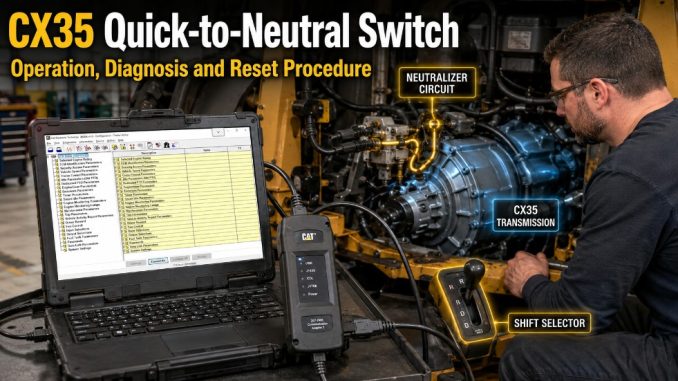
The Quick-to-Neutral switch, also called the Neutralizer switch, allows an operator to shift a CX35 transmission into neutral immediately. It is commonly used on CX well-service equipment where the transmission may need to disengage quickly during an operating or safety event.
This guide explains normal neutralizer operation, the relevant ECM configuration settings, how to verify the switch status with Cat ET, and why the selected gear may flash after the neutralizer has been activated.
Important: Transmission behavior can vary according to machine wiring, ECM programming, shift-selector configuration, and installed safety systems. Always follow the machine manufacturer’s service information and site safety procedures.
System Overview
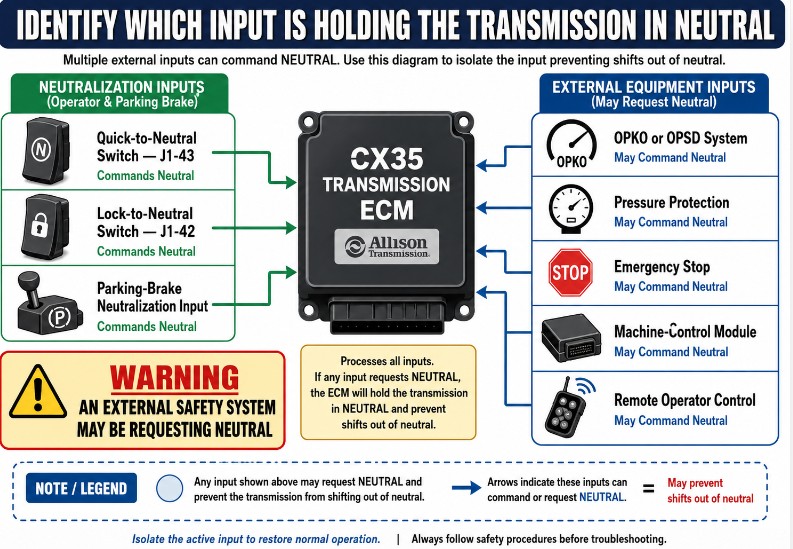
The CX35 transmission may use several inputs that can prevent a shift out of neutral:
Quick-to-Neutral switch
Lock-to-Neutral switch
Parking-brake neutralization feature
When all three features are inactive and their circuits are operating correctly, the transmission can normally shift from neutral into the selected gear.
When one of these inputs is active, incorrectly wired, or incorrectly configured, the transmission may remain in neutral even though the operator selects Drive or another range.
CAT Caterpillar ET3 Diagnostic Adapter III
Use the CAT ET3 Diagnostic Adapter III to connect the diagnostic laptop to the CX35 transmission ECM. It supports communication with Cat ET for reading fault codes, viewing neutralizer status, checking switch inputs, and confirming actual gear operation.
CAT ET software allows technicians to monitor the Quick-to-Neutral, Lock-to-Neutral, parking-brake, shift-selector, and actual-gear parameters used in this troubleshooting procedure.
Confirm that the adapter, software version, cables, and machine communication protocol are compatible with the specific CX35 transmission before ordering.
Relevant ECM Configuration Parameters
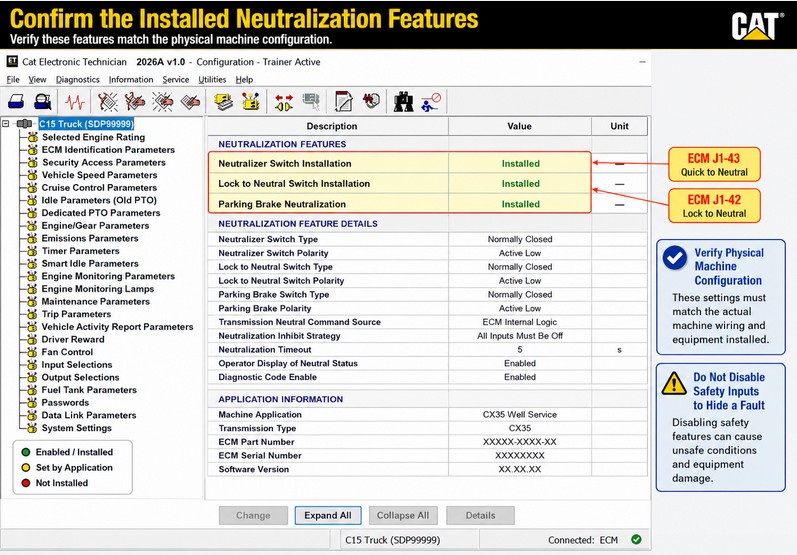
Check the following transmission ECM settings in Cat ET:
Configuration parameter
ECM circuit
Expected setting when equipped
Neutralizer Switch Installation
J1-43
Installed
Lock to Neutral Switch Installation
J1-42
Installed
Parking Brake Neutralization
Application-dependent
Installed
The Neutralizer Switch Installation parameter tells the transmission ECM whether a Quick-to-Neutral switch is fitted to the machine.
Do not change these parameters unless the actual machine wiring and equipment configuration have been confirmed.
How the Quick-to-Neutral Feature Works
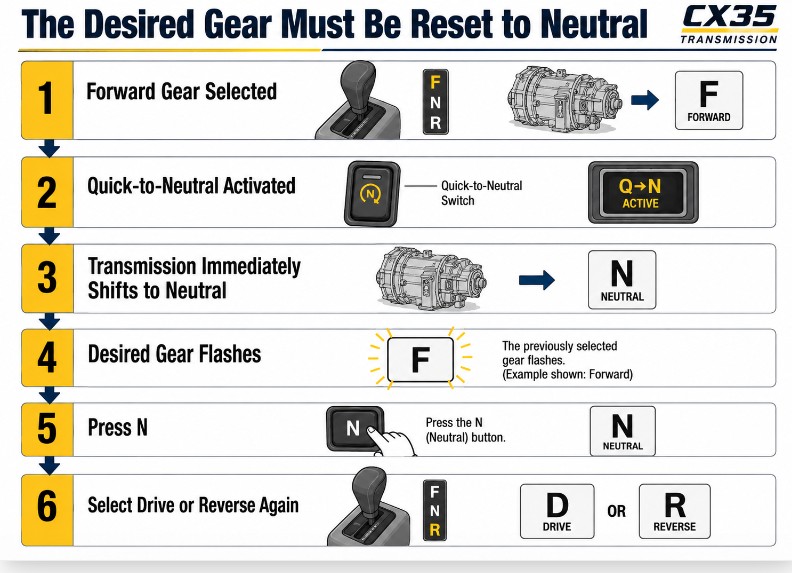
When the Quick-to-Neutral switch is activated, the transmission shifts to neutral immediately, regardless of the currently selected range.
For example, the shift selector may still display a forward range while the actual transmission gear changes to neutral.
After the neutralizer event:
The transmission remains in neutral.
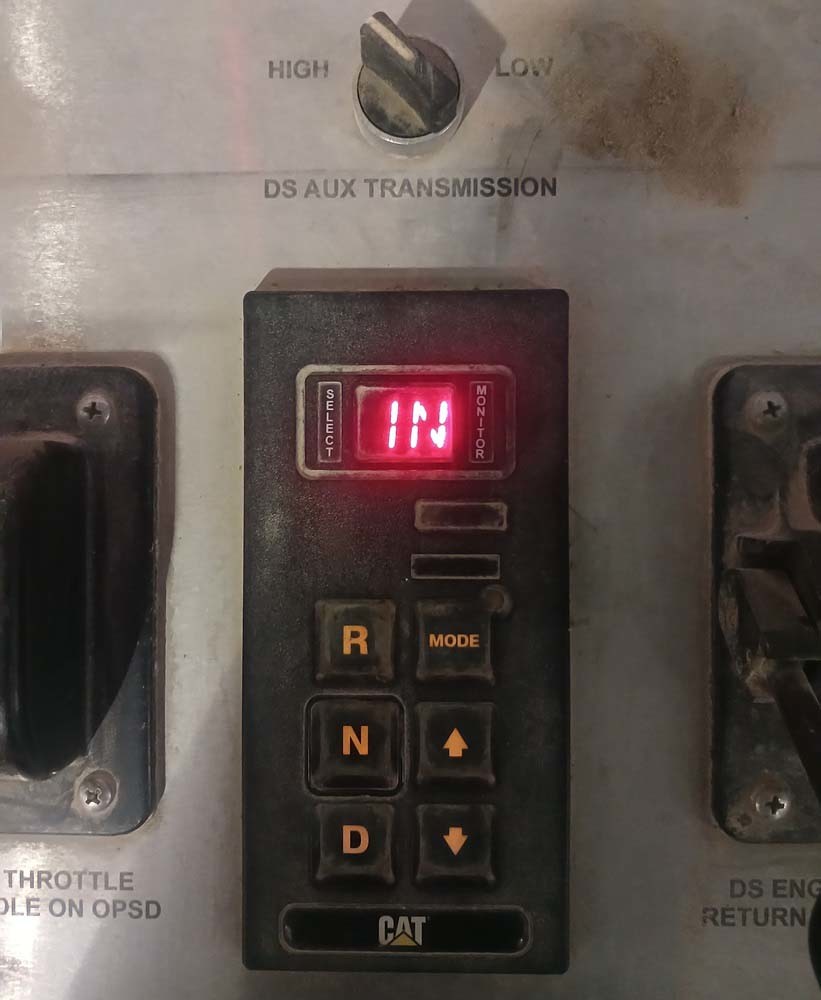
The desired gear indication may flash.
The operator must press the N button on the shift selector.
The desired gear must first be changed to Neutral.
A new drive or reverse range can then be selected.
If the desired gear is not reset to Neutral, the transmission will not shift out of neutral.
Normal Operating Conditions
When the system is operating normally:
Quick-to-Neutral switch is off.
Lock-to-Neutral switch is off.
Parking brake is released.
Transmission Neutralizer Status is Off
The transmission can engage the selected gear.
For a normally closed Quick-to-Neutral circuit, Cat ET may show the switch as closed while the neutralizer function is inactive.
Step 1: Verify the Neutralizer Switch Is Off
Connect Cat ET to the transmission ECM and locate the status for the Neutralizer switch.
The circuit is identified as:
ECM J1-43 — Quick to Neutral, normally closed
With the Quick-to-Neutral switch released, verify:
Cat ET parameter
Expected value
Neutralizer Switch
Closed or inactive
Transmission Neutralizer Status
Off
Shift Lever Position
Selected range
Actual Gear
Selected or commanded gear
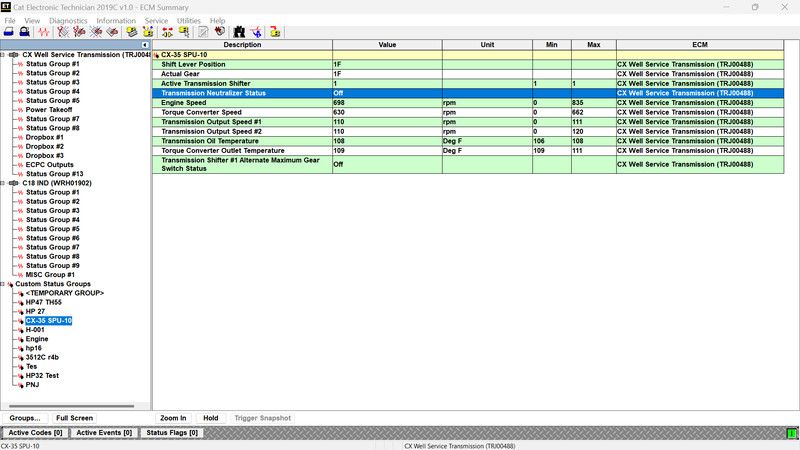
Example in Drive
Select D on the shift selector.
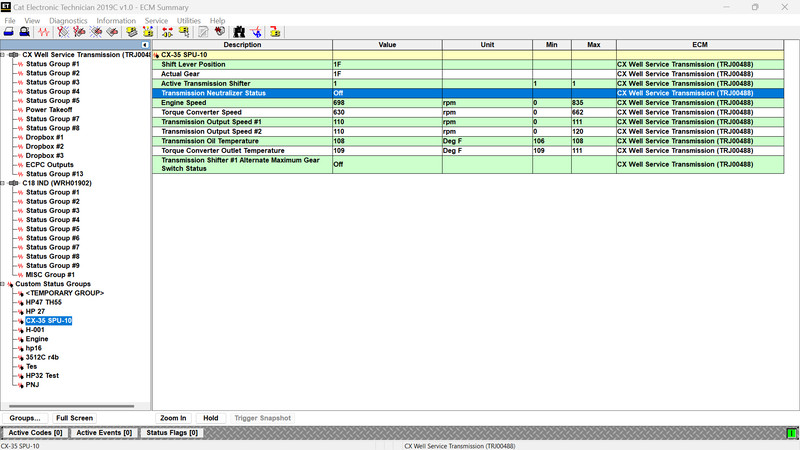
A normal display may show:
Shift Lever Position: 1F
Actual Gear: 1F
Transmission Neutralizer Status: Off
This confirms that the neutralizer input is not preventing transmission engagement.
Step 2: Activate the Quick-to-Neutral Function
Activate the Quick-to-Neutral input using the installed switch or the approved test procedure for the machine.
On some well-service units, the neutralizer may also be activated by an OPKO, OPSD, pressure-related, or other equipment-protection system.
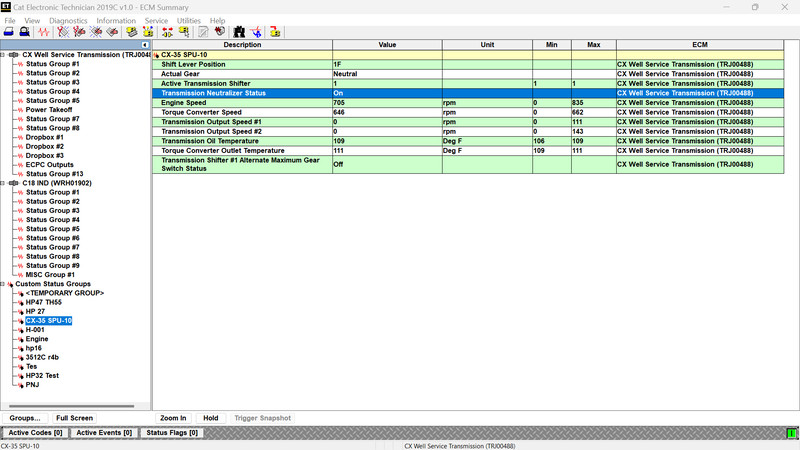
During an active neutralizer event, Cat ET may show:
Shift Lever Position: 1F
Actual Gear: Neutral
Transmission Neutralizer Status: On
The selected range remains displayed because the operator has not yet reset the desired gear. However, the transmission has already shifted to neutral.
This distinction is important:
Shift Lever Position shows the operator’s selected range.
Actual Gear shows the gear currently engaged by the transmission.
Step 3: Reset a Flashing Desired Gear
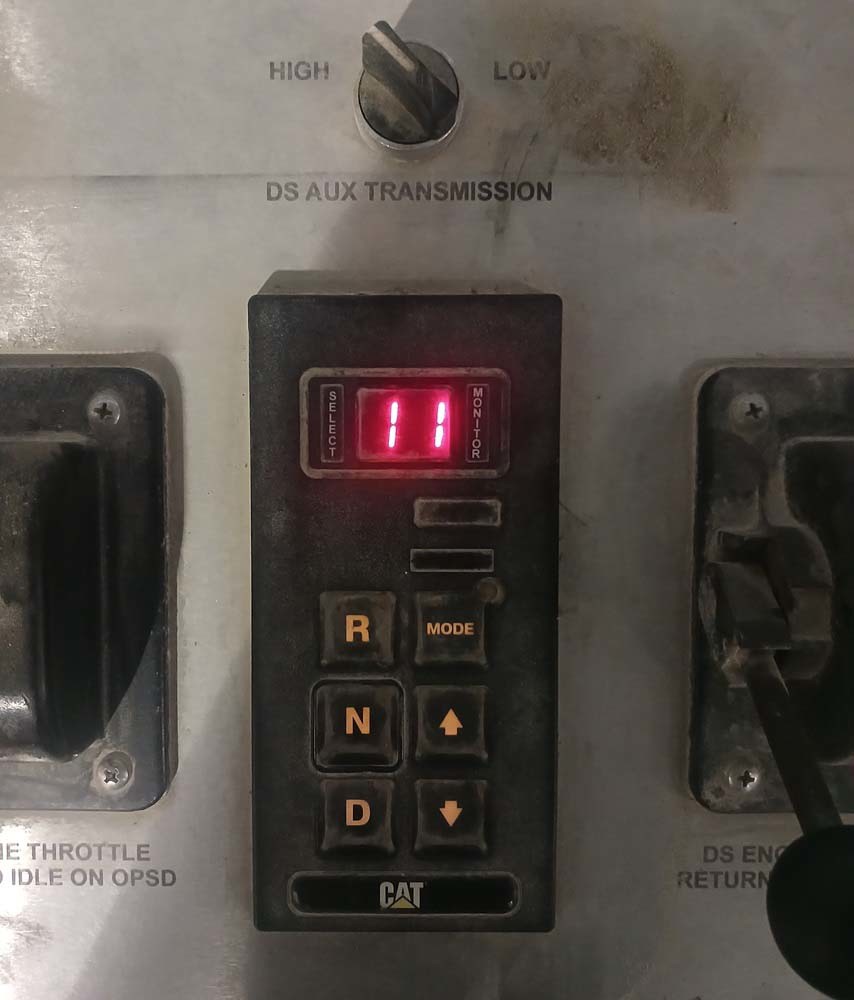
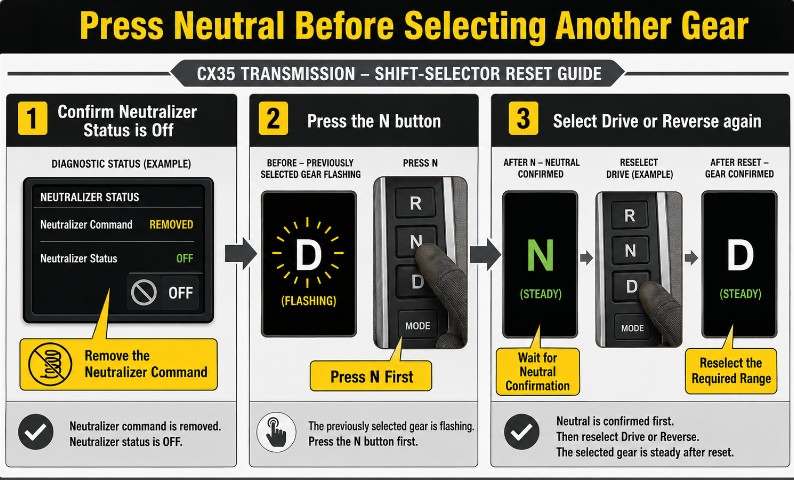
After the neutralizer becomes active, the desired gear may flash on the shift selector.
The flashing indication means the selected range is still requested, but the transmission will not engage it until the selector is reset.
Use the following procedure:
Confirm that the condition that activated Quick-to-Neutral has been removed.
Release the Quick-to-Neutral switch when manually operated.
Confirm in Cat ET that Transmission Neutralizer Status changes to Off.
Press the N button on the shift selector.
Verify that the desired gear now shows Neutral.
Select Drive or Reverse again.
Confirm that the Actual Gear changes from Neutral to the selected range.
Do not repeatedly select Drive or Reverse without first pressing Neutral. The transmission is designed to remain in neutral until the desired gear has been reset.
Cat ET Status Comparison
Condition
Shift Lever Position
Actual Gear
Neutralizer Status
Normal Drive operation
1F
1F
Off
Quick-to-Neutral active
1F
Neutral
On
Waiting for selector reset
Flashing selected range
Neutral
May be Off after input clears
After pressing N
Neutral
Neutral
Off
Drive reselected
1F or selected range
Selected gear
Off
What to Check if the Transmission Will Not Shift Out of Neutral
If the neutralizer condition remains active or the transmission will not re-engage, inspect the following areas.
Quick-to-Neutral Switch
Verify:
Switch is not stuck
Normally closed contacts operate correctly.
Connector is fully seated.
Circuit J1-43 is not open.
Wiring is not shorted or damaged.
Cat ET status changes when the switch is operated.
Lock-to-Neutral Switch
Check:
ECM J1-42 circuit
Switch status in Cat ET.
Connector and terminal condition
Harness continuity
Correct ECM configuration
A Lock-to-Neutral input can produce similar symptoms to the Quick-to-Neutral feature.
Parking-Brake Neutralization
Confirm:
Parking brake is fully released.
Parking-brake status changes correctly in Cat ET.
Brake switch is adjusted correctly.
Wiring and connectors are secure.
Parking Brake Neutralization is programmed correctly.
Shift Selector
Inspect:
N button operation
Desired gear display
Communication with the transmission ECM
Selector power and ground
Related diagnostic codes
If the transmission enters neutral but does not recognize the Neutral command, the shift selector or its communication circuit may require diagnosis.
External Safety or Equipment Inputs
On well-service equipment, Quick-to-Neutral may be activated by another control system rather than only by the dashboard switch.
Check for inputs from:
OPKO or OPSD systems
Pressure-monitoring systems
Equipment interlocks
Emergency-stop logic
Machine control modules
Remote operator controls
Do not bypass these systems merely to restore transmission engagement. Identify why the neutralizer command is active.
Diagnostic Workflow
Use the following sequence to avoid unnecessary component replacement:
Read all active and stored transmission fault codes.
Record the Neutralizer, Lock-to-Neutral, parking-brake, shift-selector, and Actual Gear statuses.
Confirm the ECM installation parameters.
Test the Quick-to-Neutral switch input.
Test the Lock-to-Neutral input.
Verify the parking-brake status.
Check whether an external machine controller is requesting neutral.
Inspect wiring at ECM J1-43 and J1-42.
Reset the desired gear by pressing N.
Select the required range and confirm engagement.
Common Diagnostic Mistakes
Replacing the transmission before checking neutralizer inputs
A transmission that remains in neutral may be responding correctly to an active safety input. Check Cat ET status values before suspecting an internal transmission failure.
Looking only at the shift-selector display
The selector may show 1F while the Actual Gear is Neutral. Always compare the selected range with the actual transmission gear.
Failing to press Neutral after activation
The transmission will not shift out of neutral until the desired gear has first been reset to Neutral.
Changing ECM parameters without checking the wiring
Programming an input as “Not Installed” may conceal a wiring or safety-system problem. Configuration must match the physical machine.
Ignoring external equipment interlocks
On CX well-service applications, another controller or protection system may activate the neutralizer. Verify the complete machine-control system.
Final Verification
After repairing the fault or correcting the active neutralizer condition:
Clear related fault codes where appropriate.
Confirm the Quick-to-Neutral status changes correctly.
Confirm the Lock-to-Neutral status is inactive.
Verify the parking brake is released.
Press N to reset the desired gear.
Select Drive and confirm Actual Gear changes to 1F.
Test Reverse where permitted.
Confirm the desired gear no longer flashes.
Verify that the transmission remains engaged during normal operation.
Perform a final Cat ET scan.
Frequently Asked Questions
What is the CX35 Quick-to-Neutral switch?
It is an input that commands the transmission to shift immediately into neutral. It may be operated manually or activated by another machine safety or protection system.
Why does the selector show 1F while Actual Gear shows Neutral?
The selector still contains the previously requested forward range, but the neutralizer has forced the transmission into neutral.
Why is the desired gear flashing?
The transmission is waiting for the operator to reset the desired gear to Neutral before another range can be engaged.
How do I shift out of neutral after the neutralizer activates?
Remove the condition that activated the neutralizer, confirm the status is Off, press the N button, and then select the required gear again.
Which ECM pin is used for Quick-to-Neutral?
The supplied procedure identifies the Quick-to-Neutral input as ECM J1-43.
Which ECM pin is used for Lock-to-Neutral?
The supplied procedure identifies the Lock-to-Neutral input as ECM J1-42.
Can the parking brake prevent the transmission from engaging?
Yes. If Parking Brake Neutralization is installed and the ECM detects that the parking brake is applied, the transmission may remain in neutral.
Conclusion
The CX35 Quick-to-Neutral feature is designed to disengage the transmission immediately when the manual switch or an equipment-protection system requests neutral.
During an active event, the shift selector may continue to display a forward range while Cat ET shows the Actual Gear as Neutral and the Transmission Neutralizer Status as On. After the neutralizer condition clears, the operator must press N before selecting another range.
When the transmission will not shift out of neutral, check the Quick-to-Neutral input at ECM J1-43, the Lock-to-Neutral input at J1-42, the parking-brake neutralization status, the shift selector, and any external safety-system commands before suspecting an internal transmission problem.
Leave a Reply